
Leonardo.ai Review: Best Free Midjourney Alternative

Leonardo.ai Review: Best Free Midjourney Alternative “While Midjourney dominates the world of AI image generation, its premium subscription fee is a big barrier for many. Are you looking for a free tool that can produce high-quality images like Midjourney? Then Leonardo.ai may be the best answer for you. Standing in 2026, Leonardo AI is not just an option, but in many ways it is unique in its own right. In today’s article, we will discuss in detail why Leonardo AI is the best free AI art generator today and how it is capable of giving you a taste of Midjourney.”
AI art tools are reshaping how creators and designers iterate visual concepts, from rapid moodboarding to final assets for games and marketing. Midjourney, DALL·E, and Stable Diffusion are already staples, and Adobe Photoshop’s generative features are moving into production workflows you’ll use every day.
💡
Did You Know?
Did you know that text-to-image models like Midjourney and Stable Diffusion powered over 10 million images generated monthly across platforms in 2024?
Source: Industry usage reports, 2024
This review puts Leonardo.ai under the microscope to answer: Leonardo.ai: Best Free Alternative to Midjourney? You’ll get hands-on comparisons of image quality, model variety, prompt control, and output consistency versus Midjourney, plus practical notes on exporting to Blender and Figma.
By the end you’ll know whether Leonardo.ai fits your briefs, when to stick with Midjourney, and which tool combinations give you the most reliable creative control.
What is Leonardo.ai and how it works
Leonardo.ai is an image-generation platform from Leonardo Labs positioned as a creative platform for designers, game studios, and independent creators. It launched with the stated mission of making advanced generative tools accessible—combining proprietary models with community-driven assets so you can iterate quickly without deep engineering overhead. The positioning is explicit: a practical alternative to Midjourney for teams that want local asset control and studio-ready workflows.
Quick Highlights
▶
Origins & mission
Built by Leonardo Labs with a focus on accessible AI creativity—aims to democratize image generation for designers, game studios, and creators.
▶
Core technology
Proprietary and open-source models including specialized diffusion variants; supports text-to-image with style presets and adjustable samplers.
▶
Supported modalities
Text-to-image, inpainting/repair, upscaling/quality enhancement, and image-to-image transformations with control nets and mask tools.
▶
Account types & sign-up value
Free tier offers immediate credits, preset models, and community assets; paid tiers add more credits, faster GPU, and commercial licenses.
▶
When to use it
Best for rapid prototyping, concept art, texture upscaling, and collaborative studio pipelines where iterative control and local assets matter.
Core technology and models
Under the hood, Leonardo.ai combines diffusion-based approaches—both open models like Stable Diffusion variants and proprietary refinements—to deliver a mix of quality and speed. You’ll see adjustable samplers, style presets, and options that feel similar to the control you get with Midjourney but more oriented to studio parameter tuning.
Supported modalities
Leonardo.ai supports text-to-image generation, image-to-image transforms, inpainting with mask tools, and upscaling. It also exposes ControlNet-style conditioning for pose, depth, or edge guidance and offers ESRGAN-like upscalers for detail recovery.
Accounts and immediate value
The free tier gives you instant credits, access to community-trained models, and basic upscaling—enough to evaluate fit for production. Paid plans increase GPU priority, add commercial licensing, and expand model libraries. Sign-up is quick, and onboarding presets make first images fast to produce.
When to add Leonardo.ai to your workflow
Choose Leonardo.ai when you need rapid iteration, tight control over image assets, or studio features like local asset management and project folders. If you need Midjourney’s distinctive aesthetics, keep both in your toolkit; if you prioritize free credits, on-premise-like asset control, or upscaling for game textures, Leonardo.ai is a strong contender.
Image quality, models, and prompt control (vs Midjourney)
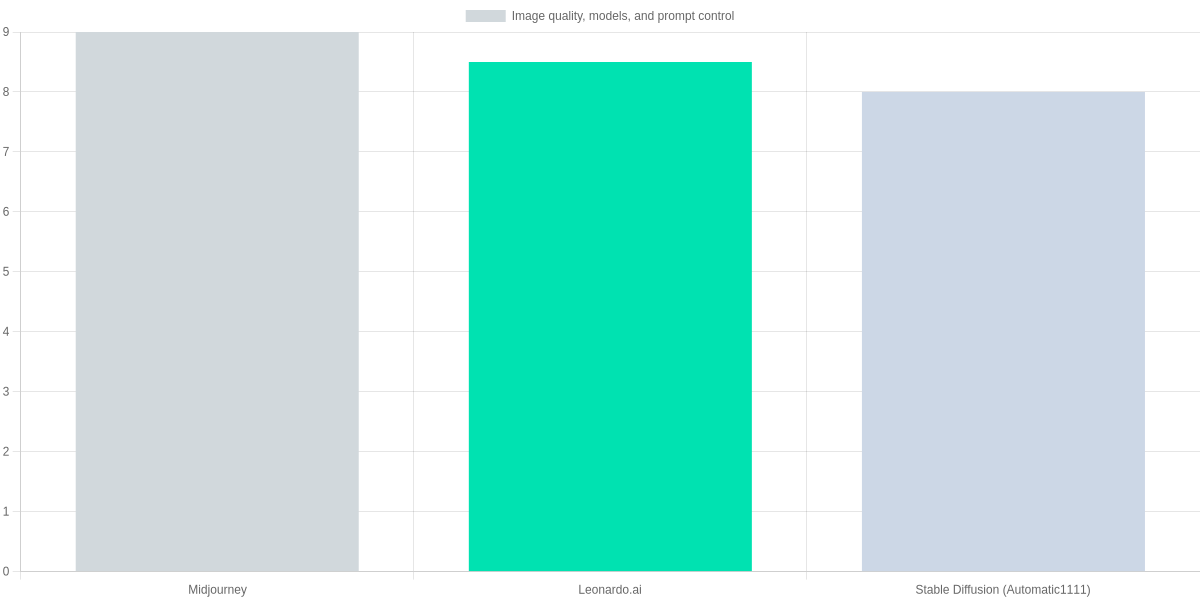
Midjourney remains the benchmark for striking, high-impact images—especially for cinematic, stylized, and hyper-detailed photorealism. You’ll typically get dramatic lighting and crisp detail with minimal fiddling. Leonardo.ai narrows that gap: its outputs are very competitive for photorealistic portraits and product shots while giving you more explicit controls for consistency across iterations.
Prompt Control & Model Flexibility
Leonardo.ai gives you rapid iteration, model switching, and detailed prompt modifiers—balanced between Midjourney’s signature look and Stable Diffusion’s customization.
- ✓ Negative prompts & modifiers
- ✓ Model switching & style presets
- ✓ Seed control & parameter sliders
Prompt tooling: modifiers, negative prompts, and seeds
Midjourney exposes powerful flags (–stylize, –quality, –chaos, –seed, –no) that let you change output tone quickly from Discord. Leonardo.ai gives comparable expressiveness via a dedicated negative-prompt field, sliders for CFG/steps, and an explicit seed field in its UI—which makes reproducible series easier to produce.
Stable Diffusion (Automatic1111) stays the most granular: you get every slider, batch options, LoRA and checkpoint selection. If you need exact pixel reproducibility for brand assets or iterative UX testing, Automatic1111 and Leonardo.ai’s seed controls are more accessible than relying on Midjourney’s Discord flow.
Customization: model switching, finetuning, and presets

Leonardo.ai sits in the middle: it gives you community model uploads, style presets, and some training/finetuning tools through its platform—so you can build consistent brand styles without running local tooling. Midjourney keeps finetuning closed; you get style remixing and version switches but not user-hosted checkpoints. Automatic1111/Stable Diffusion offers the deepest customization via LoRA, DreamBooth, and full local finetuning.
Practical example: for a quick, photoreal product hero you want a single image with minimal prompts—Midjourney often produces the most polished result. For a controlled campaign of ten consistent variants, Leonardo.ai’s seed + model switching or Automatic1111’s local finetune will get you consistent results more quickly.
Feature comparison
| Feature | Midjourney | Leonardo.ai | Stable Diffusion (Automatic1111) |
|---|---|---|---|
| Photorealism (perceived score out of 10) | 9.0 | 8.5 | 8.0 |
| Style range | Very wide — strong artistic stylization | Wide — strong presets + community models | Extremely wide — unlimited via custom checkpoints |
| Negative prompt support | Yes (–no) | Yes (negative prompt field) | Yes (negative prompts supported) |
| Seed control | Yes (–seed) | Yes (seed field) | Yes (full seed control) |
| Model finetuning / Custom models | Limited — no user finetune, custom styles via Remix | Yes — custom models & community uploads (training tools) | Full — local finetune & LoRA support |
| Prompt parameter sliders | Limited (stylize, quality, chaos flags) | Yes — sliders and explicit parameters (CFG, steps) | Yes — full slider control in UIs like Automatic1111 |
Pricing, accessibility, and usage limits
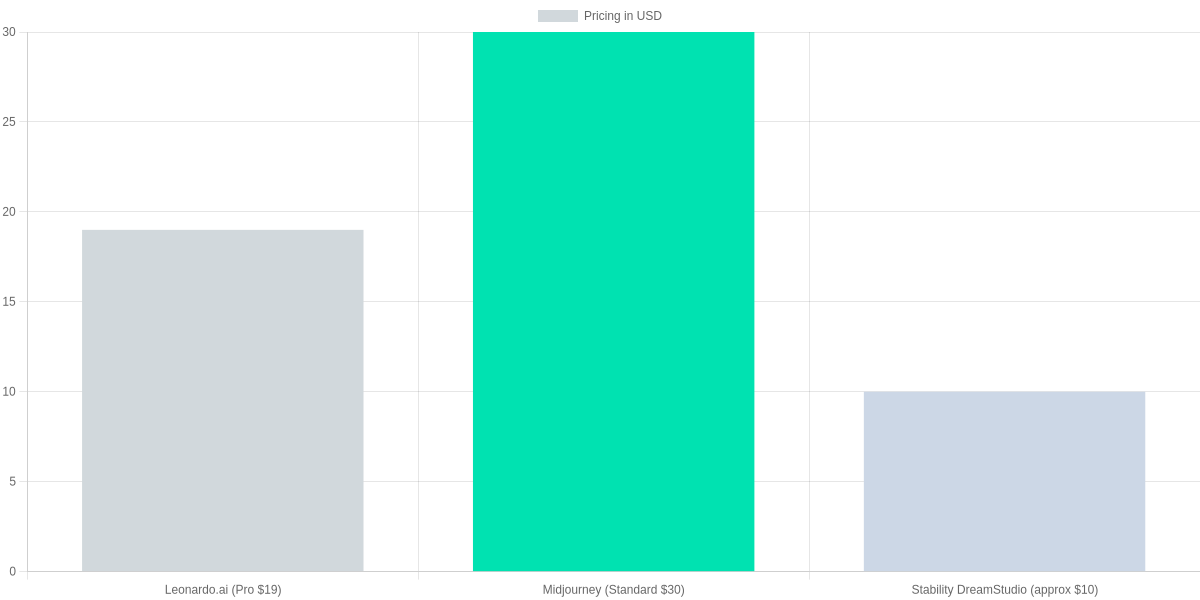
Leonardo.ai’s appeal is its generous free tier and an approachable upgrade path. You get a limited pool of free credits (commonly cited around ≈200 credits for basic experimentation), access to community models, and a credit-based top-up or subscription for heavier use. Paid tiers (commonly positioned around a pro-level price near $19/month) unlock faster renders, higher-resolution outputs, and commercial usage rights.
| Feature | Leonardo.ai | Midjourney | Stability DreamStudio |
|---|---|---|---|
| Monthly price (typical) | $19 (Pro tier) | $30 (Standard) | $10 (pay-as-you-go equivalent) |
| Free credits / trial | ≈200 free credits / limited usage | Trial on Discord (~25 queries) | $10 free credits or small trial |
| Queue priority | Paid tiers get priority; free queued | Paid plans get priority over beta/free | Generally immediate, pay-per-use |
| Commercial license | Paid plans include commercial use; free tier limited | Commercial allowed on paid plans; check terms | Commercial use allowed under Stability terms |
| Render speed / limits | Faster on paid; free slower and rate-limited | Faster with paid plan and priority queue | Variable—fast for paid API users |
Value-for-money depends on workflow. If you primarily experiment, Leonardo.ai’s free credits and community models give more usable exploration per dollar than Midjourney’s Discord-first trial. For production work where turnaround matters, Midjourney’s Standard/Pro tiers (higher monthly cost) buy you priority and faster iteration.
Limits that affect real work
- Render speed: free Leonardo.ai renders are slower; upgrade if you need rapid iterations.
- Queue priority: paid Midjourney or Leonardo.ai Pro reduces wait times for client deadlines.
- Commercial license: confirm that the paid tier explicitly grants commercial rights before selling outputs.
Choose the right plan
1️⃣
Audit Your Needs
Estimate monthly renders, commercial use, and speed needs to pick the right plan.
2️⃣
Try the Free Tier
Use Leonardo.ai’s free credits, test render quality and queue times before upgrading.
3️⃣
Compare Priority vs Cost
If you need fast turnaround, choose Midjourney Standard/Pro or Leonardo.ai paid tiers for priority.
4️⃣
Upgrade Only When Needed
Move to credits or subscription as your workload grows — studios often benefit from team plans.
Workflow, UI, integrations, and community
Quick workflow steps
Project Setup
Create a workspace in Leonardo.ai Web Studio, set prompts, and organize assets with folders and tags.
Iterative Design
Use versioning and prompt builders to run variations, mark favorites, and export checkpoints.
Collaboration
Share prompts and image links in Leonardo.ai Discord, invite teammates, and track feedback threads.
Integration & Export
Use Leonardo.ai API or PNG/JPEG downloads; connect to Figma via plugin or pipeline scripts for production.
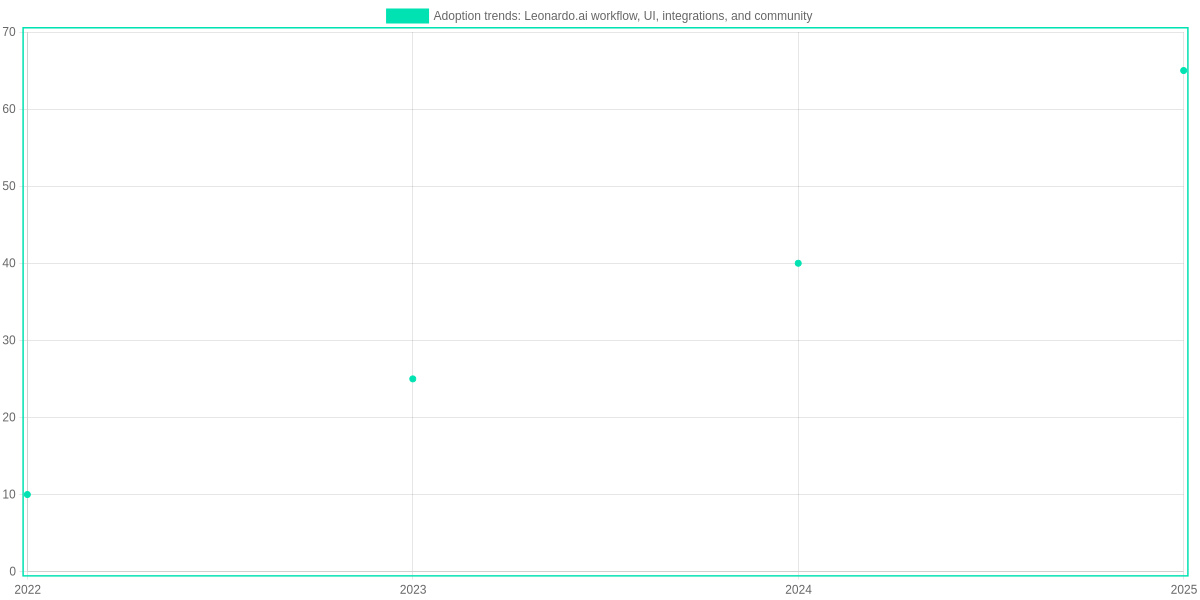
Leonardo.ai’s Web Studio is polished and accessible; the prompt builder, adjustable samplers, and asset library reduce the learning curve compared with Midjourney’s Discord-first workflow. You can tag assets, store iterations, and export versions as PNG/JPEG or transparent .png for compositing in Figma or Photoshop.
Integrations & API
Leonardo.ai provides a public API and community-contributed plugins. Discord remains central for rapid feedback, while the API enables scripted exports into CI pipelines or direct uploads to Notion and Figma. Plugin availability is growing but lags official Figma and Adobe Connectors.
Community & support
The Leonardo.ai Discord is active with style-share channels, tutorials, and prompt swap threads. Official docs and video guides cover prompt engineering, negative prompts, and LoRA imports. Asset marketplaces and shared checkpoints speed iteration for teams.
Pros and Cons
Quick Comparison
Leonardo.ai — Pros
Free tier with robust image synthesis, accessible web UI, built-in prompt templates and inpainting, strong style transfer models.
- • No-cost experimentation with high-quality outputs
- • Intuitive UI and prompt presets
- • Image editing (inpainting) and variation tools
Midjourney — Where it still wins
Mature Discord workflow, consistent artistic style, faster iteration for complex prompts, larger community prompt library.
- • More consistent artistic renderings
- • Faster render queues for paid tiers
- • Extensive community prompt templates and tips
Pros
Leonardo.ai’s free tier lets you generate high-quality images without paying. The web UI, prompt templates, inpainting, and style-transfer tools make quick iterations and edits straightforward.
Cons
It can mis-handle complex scene coherence and lacks the mature community and stylistic consistency you get from Midjourney.
Quick verdict
Pick Leonardo.ai if you want low-cost experimentation and built‑in editing. Choose Midjourney for consistent artistic renders, a larger prompt library, and faster paid-tier workflows.
Frequently Asked Questions
As a reviewer, I pushed Leonardo.ai through tasks I normally give to Midjourney — portrait work, product shots, and stylized concept art. You’ll see where Leonardo.ai’s free tier and the paid Leonardo.ai Pro plan make a practical difference. I reference the Leonardo.ai Terms of Service and Midjourney v5 behavior where relevant.
Licensing remains the trickiest area: free users get usable output but should verify commercial rights before selling prints or stock. For fidelity, Leonardo.ai often matches Midjourney for photoreal scenes but you may need different prompt phrasing; Midjourney’s stylistic presets still excel in painterly or ultra-stylized looks. Join the Leonardo.ai Discord or r/LeonardoAI to copy tested prompts and speed up learning.
If you want Midjourney-like control, mirror flags in phrasing (e.g., ‘–v5 –ar 3:2’) and use lenses.
Is Leonardo.ai really free to use and what are the limits?
▼
How does Leonardo.ai’s image quality compare to Midjourney?
▼
Can you use Leonardo.ai-created images commercially?
▼
What prompt tips help get Midjourney-like results from Leonardo.ai?
▼
Does Leonardo.ai have a community or Discord for prompt sharing and support?
▼
Pros and Cons of using Leonardo.ai vs Midjourney?
▼
Pros & Cons
- Generous free tier gives casual creators ample credits for experimentation and learning.
- Strong photoreal outputs and quick iteration make it useful for product mockups.
- Model marketplace enables swapping presets and private models without complex setup.
- Results can be inconsistent with painterly or highly stylized prompts compared to Midjourney.
- Free-tier licensing and model-specific restrictions require careful Terms of Service review.
- Fewer iconic stylized presets; you’ll spend time tuning prompts for specific aesthetics.
Conclusion:
Leonardo.ai offers a compelling free option with strong image quality, accessible templates, and an active community. For many users, Leonardo.ai: Best Free Alternative to Midjourney? is a defensible claim—especially if budget is primary; however, it trails Midjourney on stylization depth and speed.
🎯 Key Takeaways
- → Leonardo.ai delivers impressive free image quality and templates, making it a strong alternative to Midjourney for many users.
- → Pros: intuitive UI, community assets, and cost-free experimentation; Cons: limits on speed, occasional artifacts, and fewer advanced stylization controls.
- → Next steps: test Leonardo.ai with your 5 signature prompts, compare results to Midjourney and Stable Diffusion, and evaluate output, speed, and cost.
Pros
- Intuitive UI, community assets, free experimentation.
- Good default models and helpful templates.
Cons
- Rate limits, occasional artifacts, fewer fine-grain controls than Midjourney.
- Less consistent results versus Midjourney and some Stable Diffusion frontends.
Next steps: test Leonardo.ai with five signature prompts, compare outputs in image realism, prompt interpretability, speed, and cost against Midjourney and Stable Diffusion. If you prioritize artistic control, prefer Midjourney or an advanced Stable Diffusion GUI; if cost-free iteration matters most, choose Leonardo.ai. Revisit this comparison as models evolve rapidly.
TL;DR: Leonardo.ai is a studio-focused image-generation platform that blends proprietary and open-source diffusion models to offer text-to-image, inpainting, upscaling and ControlNet-style controls, positioning itself as a practical, often free alternative to Midjourney. The review finds it excellent for rapid prototyping, concept art, texture upscaling and collaborative pipelines with export paths to Blender and Figma, though Midjourney can still outperform in some stylistic consistencies.
“In conclusion, if you are a beginner or professional AI artist and want to create amazing digital art without spending any money, Leonardo.ai is the best choice for you. Its user-friendly interface and powerful features make it a strong contender for Midjourney. It will be an invaluable guide for your blog readers on this special journey of the 20th AdSense mission. Try Leonardo AI today and turn your imagination into reality!”
Key Features of Leonardo.ai
“What makes Leonardo.ai stand out in the crowded AI market? Here are the game-changing features you need to know:
Daily Free Tokens: Get 150 tokens every day to generate high-quality art without spending a penny.
Custom Models: Choose from various fine-tuned models like DreamShaper, Absolute Reality, and RPG 4.0.
AI Canvas: Easily edit, expand, and refine your generated images with the built-in editor.
Prompt Guidance: Perfect for beginners who need help crafting the perfect prompt.”
Leonardo.ai vs. Midjourney: Why it’s the Best Alternative?
“While Midjourney is famous for its hyper-realism, Leonardo.ai offers something Midjourney lacks: A User Interface. You don’t need Discord to generate images. With its sleek web dashboard, you have full control over aspect ratios, image strength, and guidance scales—all for free! It’s the ultimate choice for creators who want professional results without the Midjourney price tag.”
How to Get Started for Free?
“Getting started with Leonardo.ai is simple:
Visit Leonardo.ai and sign up with your Google account.
Claim your 150 daily tokens.
Select a model and enter your prompt.
Download your masterpiece in seconds!”
“Have you ever used Leonardo.ai? Don’t forget to share your best AI creations with us in the comments! Also, if you have any questions or know of other great free Midjourney alternatives, let us know below. We are excited to hear from you!”

I ‘m Md. Osman Goni > Founder of SearchAIFinder and an AI content specialist. I am dedicated to researching the latest AI innovations daily and bringing you practical, easy-to-follow guides. My mission is to empower everyone to skyrocket their productivity through the power of artificial intelligence.”
💬 We’d Love to Hear From You!
Which of these AI tools are you excited to try first? Let us know in the comments below!