
Best Open Source AI Models 2026: Llama 4 & Beyond
Best Open Source AI Models 2026: Llama 4 & Beyond, The AI revolution is no longer confined to large labs; it is now within our reach. When tech giant Meta unveiled its Llama 3, the very definition of open source AI changed. But in 2026, the question is—is Llama 3 the end of the world? Or is there an even more powerful open source model waiting for us?
In today’s detailed review, we’ll look at why open source models are now giving a tough fight to closed source models like ChatGPT or Claude. Are you a developer, AI enthusiast, or an entrepreneur? Read our in-depth analysis to find out which one could be the best for your privacy and customization in 2026. We’ll be taking a closer look at each model’s real-time performance, coding skills, and logical reasoning, from the Llama 4 Scout to the Mistral and Google’s Gemma. Let’s dive deep into this new revolution in the digital world! 🏙️✨
Open-source AI models matter now because they let you control data, cut cloud expenses, and iterate quickly. Projects like Llama 3, Mistral, and Falcon shifted the landscape for developers and enterprises.
Did You Know?
Did you know many open-source models let you run inference locally, cutting cloud costs and improving data privacy compared with cloud-only APIs?
Source: Model adoption reports & community benchmarks
This review, Best Open Source AI Models (Llama 3 & Beyond), gives you an overview, in-depth reviews, side-by-side comparisons, pros and cons, and practical guidance for deployment with tools like Hugging Face, Ollama, and FastChat.
Pros and cons to watch:
- Pros:
- Local inference & privacy
- Strong customization and fine-tuning
- Lower long-term inference costs
- Cons:
- Requires significant GPU hardware
- Licensing and compatibility caveats (model-specific)
- Less polished tooling than closed-source APIs
Overview: Top Open Source Models and Key Specs
This snapshot compares leading open-source models you should know for deployment: Llama 3 variants, Mistral 7B, Falcon 40B, MPT-30B, BLOOM-176B, and GPT-J-6B. It focuses on parameter counts and approximate FP16 on-disk sizes to orient your deployment choices across edge, cloud, and research workloads. This piece is part of Best Open Source AI Models (Llama 3 & Beyond) review and prioritizes tangible specs for real-world planning.
Visual snapshot: Where each model fits and key specs
Llama 3 (8B / 16B / 70B)
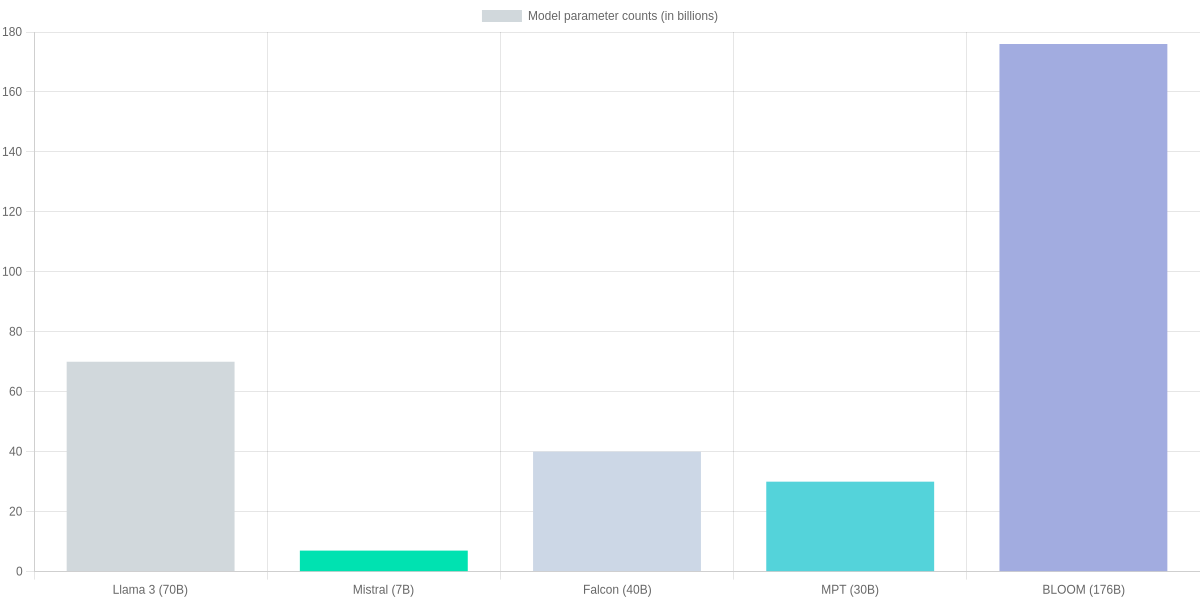
Variants from ~8B to 70B parameters; on-disk FP16 sizes ~16GB / 32GB / 140GB. Suited from edge (8B) to cloud/high-performance inference (70B).
Mistral 7B
7B parameters; FP16 ≈14GB. High efficiency for cloud microservices and modest on-prem GPU setups; strong for cost-conscious deployments.
Falcon 40B
40B parameters; FP16 ≈80GB. Good balance of capability and cost for production-grade cloud inference and research experiments.
MPT-30B
30B parameters; FP16 ≈60GB. Versatile for fine-tuning, multi-domain tasks, and medium-scale cloud deployments.
BLOOM-176B
176B parameters; FP16 ≈352GB. Research-grade scale for large experiments and multilingual tasks—requires specialized infra or sharding.
GPT-J-6B
6B parameters; FP16 ≈12GB. Lightweight option for edge prototypes and low-cost inference; lacks latest instruction-tuning refinements.
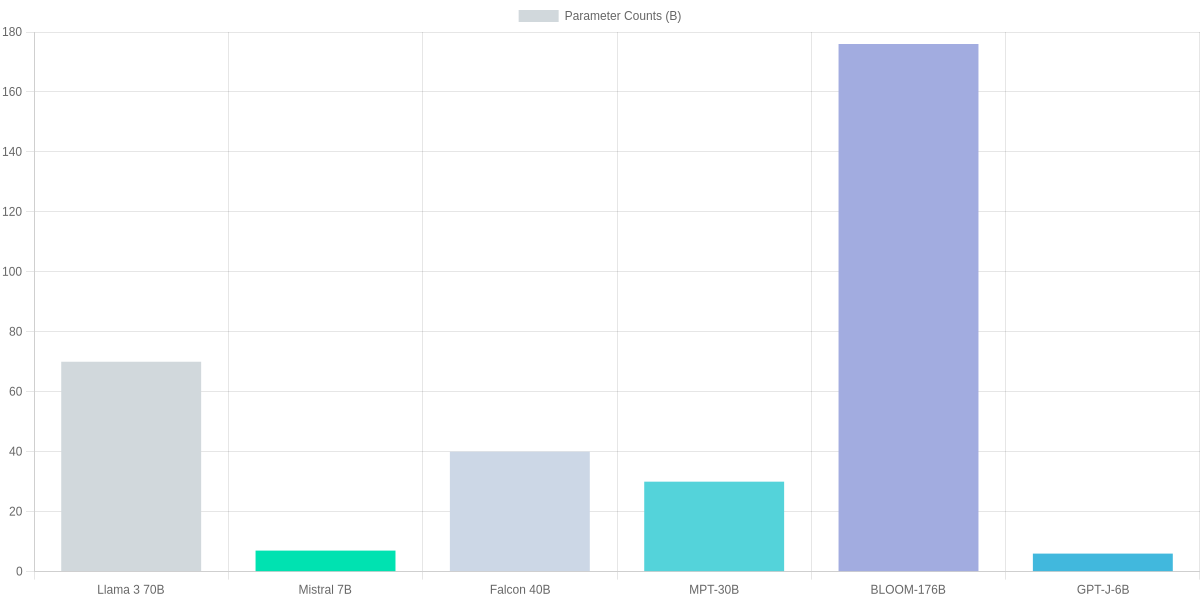
The bar chart below visualizes parameter counts (in billions) so you can quickly gauge memory footprint and sharding complexity for Llama 3 70B, Mistral 7B, Falcon 40B, MPT-30B, BLOOM-176B, and GPT-J-6B.
Pros & Cons
- Pros: Llama 3 family — broad range for edge to large-cloud; strong instruction tuning at scale.
- Pros: Mistral 7B & GPT-J-6B — cost-efficient, low-memory deployment for prototypes.
- Pros: Falcon 40B / MPT-30B — sweet spot for production cloud inference and fine-tuning.
- Cons: BLOOM-176B — requires large sharded infra and high cost.
- Cons: Larger Llama 3 variants — high memory and inference latency without optimized runtimes.
- Cons: GPT-J-6B — fewer modern instruction-tuning benefits out of the box.
In-Depth Reviews: Llama 3, Mistral, Falcon, MPT, BLOOM
You need clarity when choosing between Llama 3, Mistral, Falcon, MPT, and BLOOM. Below are focused, model-by-model reviews that highlight strengths, weaknesses, typical use cases, and deployment/fine-tuning trade-offs so you can weigh what matters for your project.
Model Snapshot
Quick reference for trade-offs: parameter scale, typical deployment targets, and fine-tuning fit for Llama 3, Mistral, Falcon, MPT, and BLOOM.
- ✓ Llama 3: high-quality, research-grade; heavier GPU needs
- ✓ Mistral 7B: efficient, great for edge/low-latency
- ✓ Falcon 40B: strong server-side generation, balanced
- ✓ MPT-30B: customization-friendly; good for fine-tuning
- ✓ BLOOM 176B: massive-scale research workloads
Llama 3 (70B)
Strengths: Llama 3 offers top-tier instruction-following and high-quality text generation at larger scales. It’s a go-to when you need strong reasoning and coherent long-form outputs.
Weaknesses and deployment: The 70B variant demands substantial GPU memory (often in the ≈80–100 GB fp16 range) and introduces latency on commodity hardware. For production you’ll likely use multi-GPU or quantization (ex: 4-bit) to reduce costs. Tooling support from Meta and community adapters makes LoRA and adapter-based fine-tuning practical but resource-intensive.
- Pros: High-quality outputs; strong research ecosystem.
- Cons: Heavy GPU requirements; higher inference cost.
Mistral (7B)
Strengths: Mistral 7B is extremely efficient—low memory footprint and fast inference make it ideal for latency-sensitive or cost-constrained deployments.
Weaknesses and deployment: Accuracy on very complex reasoning tasks lags behind larger models, but it’s highly LoRA-friendly and can be fine-tuned on a single 16–24 GB GPU for many use cases. It’s an excellent candidate for edge inference or scaled microservices.
- Pros: Low latency, small memory needs, cost-effective.
- Cons: Not as strong on large-context reasoning as bigger models.
| Feature | Llama 3 (70B) | Mistral (7B) | Falcon (40B) | MPT-30B |
|---|---|---|---|---|
| Parameters (B) | 70 | 7 | 40 | 30 |
| Typical GPU memory (approx) | ≈80–100 GB (fp16) | ≈10–16 GB (fp16) | ≈48–64 GB (fp16) | ≈48–64 GB (fp16) |
| Best use case | High-quality instruction following, research-grade assistants | Edge/low-latency inference, cost-sensitive apps | Server-side large-context generation and apps | Custom models, chatbots, specialized fine-tuning |
| Fine-tuning friendliness | Adapter/LoRA friendly but resource-heavy for full-tune | Very LoRA-friendly; efficient training | Supports LoRA and full fine-tuning; growing toolchain | Designed for customization; strong MosaicML tooling |
| Licensing & ecosystem | Strong community and Meta tooling; active research ecosystem | Commercial-friendly distribution with Mistral tooling | Active community forks; solid open-source tooling | MosaicML ecosystem; permissive for production |
Falcon (40B)
Strengths: Falcon 40B balances scale and cost—strong for server-side generation and large-context tasks without the full cost of 70B+ models.
Weaknesses and deployment: Expect moderate GPU needs (≈48–64 GB fp16). It’s suitable for production services where latency is acceptable on server hardware. Fine-tuning with LoRA is common; tooling and community models continue to improve.
- Pros: Good performance-to-cost ratio; strong community support.
- Cons: Larger than Mistral; still non-trivial to serve cheaply.
MPT-30B
Strengths: MPT-30B is built for customization—MosaicML tooling makes fine-tuning and deployment straightforward for chatbots and domain specialists.
Weaknesses and deployment: Memory needs are similar to other 30–40B models. You’ll see best results with adapter/LoRA approaches to keep costs down, and MosaicML integration simplifies reproducible training pipelines.
- Pros: Excellent for fine-tuning and production customization.
- Cons: Larger GPU footprint than 7B models; moderate latency on single-GPU setups.
BLOOM (176B)
Strengths: BLOOM’s 176B architecture is tailored for large-scale research and multilingual tasks—it sets a ceiling for capability among open models.
Weaknesses and deployment: The model’s scale means very high infrastructure cost and complexity; you’ll need distributed GPU clusters or specialized inference stacks. Fine-tuning at full scale is challenging; adapters and parameter-efficient methods are essential.
- Pros: Massive multilingual capabilities for research-grade tasks.
- Cons: Very high memory and operational costs; complex deployment.
How to Choose the Right Open-Source Model for Your Project
Start by matching the model to the task: retrieval-augmented generation, chat, classification, or embeddings. Prioritize latency, memory footprint, budget, and privacy constraints. Evaluate fine-tuning support—LoRA/QLoRA compatibility and checkpoint availability matter for production adaptation.
Selection Steps
Assess Task
Classification, generation, retrieval-augmented tasks—pick models like Llama 3 for chat, Mistral for concise inference.
Set Constraints
Define latency, memory, budget, and privacy; consider quantization and on-device needs.
Evaluate Models
Compare Llama 3, Mistral, Falcon, and Llama 2 on benchmarks, fine-tuning support, and license terms.
Optimize
Use 4-bit/8-bit quantization, LoRA or QLoRA fine-tuning, and distillation with TinyLlama or Llama-2 distilled variants.
Deploy & Fallback
Choose edge (ONNX, NNAPI) or cloud (Vertex AI, AWS SageMaker); implement multi-model ensembles and lightweight fallbacks.
Practical Optimization Tips
Quantize with BitsAndBytes or ONNX Runtime for CPU/edge savings. Distill larger models into TinyLlama-like variants when latency matters. Fine-tune with Hugging Face Transformers + PEFT using LoRA or QLoRA. Use prompt engineering and system messages for cost-effective control.
Deployment Patterns
- Edge: ONNX, NNAPI, or TensorRT for on-device inference.
- Cloud: AWS SageMaker, Google Vertex AI, or Triton for scalable endpoints.
- Hybrid: multi-model ensembles with a small fallback (Distilled Llama) when the primary fails.
Pros and Cons
- Pros: Control, privacy, lower inference costs, flexible fine-tuning.
- Cons: Operational complexity, maintenance, and license nuances across Llama 3, Mistral, Falcon, and Llama 2.
Community, Licensing, and Ecosystem: Risks and Opportunities
You should treat “open source” variably: Llama (Llama 2/3 lineage), Mistral 7B, and Falcon 40B expose weights and tooling differently, so community access doesn’t always equal unrestricted commercial use. Review licenses and model cards before deploying.
Licensing tradeoffs
Licensing tradeoffs are practical. Meta’s Model/Community License grants broad research access but includes use-case and governance restrictions you must evaluate. Mistral’s terms are generally permissive; Falcon’s Apache 2.0 is commercially friendly.
Ecosystem snapshot: Meta Llama vs Mistral 7B
Meta Llama (Llama 2 / Llama 3 lineage)
Meta’s Llama family has strong Hugging Face presence, official model cards, and growing support in runtimes like llama.cpp and GGML ports. Licensing varies by release; community forks and converters are common.
- • Official model cards on Hugging Face
- • Ports: llama.cpp, GGML, bloom-transformer-converter
- • Commercial-use clauses in Meta licenses
Mistral 7B
Mistral 7B is praised for permissive licensing and fast adoption across Hugging Face, Ollama, and inference runtimes like GGUF/llama.cpp conversions.
- • Apache-like permissive license (model-specific)
- • Well-supported on Hugging Face and Ollama
- • Lightweight inference with GGUF/llama.cpp
Ecosystem support
Tooling is mature: Hugging Face hosts model cards, while runtimes like llama.cpp, GGML/GGUF converters, and bitsandbytes or transformers-accelerations enable CPU/GPU inference. You can often run 7B-class models on local machines via GGUF or ggml ports.
You should track governance updates and vendor statements regularly.
Community, Licensing, and Ecosystem: Comparison
| Feature | Meta Llama (Llama 2 lineage) | Mistral 7B | Falcon 40B |
|---|---|---|---|
| License | Meta Model License / Community License — allows research and commercial use with restrictions | Permissive (Mistral license, broadly permissive for research/commercial use) | Apache 2.0 (TII released Falcon under permissive terms) |
| Hugging Face Presence | Extensive model cards, large community forks and datasets | Strong presence, active integration and community repos | Available on Hugging Face, active community and forks |
| Inference Runtime Support | Widely supported: llama.cpp, GGML, GGUF converters, bitsandbytes optimizations | Good support: GGUF, llama.cpp ports, Ollama integrations | Supported via transformers, ggml conversions, community ports |
| Commercial Use Risk | License includes use-case restrictions and governance clauses to review | Lower friction for commercial deployment but check model-specific terms | Permissive for commercial use under Apache 2.0 |
| Community Activity | Large userbase, rapid third-party tooling but governance uncertainty | Fast-growing developer community, responsive updates | Strong research backing and community contributions |
Risk checklist
- Commercial use: verify license clauses and third-party restrictions.
- Safety: add moderation, guardrails, and model monitoring.
- Maintenance: prefer models with active GitHub/Hugging Face communities.
- Inference risk: dependency on converters (ggml, GGUF) can break compatibility.
- Commercial integrations: audit legal and security impacts before deployment.
Pros and Cons
Pros
- Rapid innovation and tooling: llama.cpp, GGUF, Hugging Face.
- Commercial paths exist for Mistral and Falcon.
- Local deployment feasible for 7B-class models.
Cons
- License ambiguity: Meta clauses may restrict some uses.
- Fragmented tooling increases integration overhead.
- Long-term maintenance depends on community and corporate support.
১. The Future of Fine-Tuning
“Fine-tuning has become the secret weapon for developers in 2026. Unlike closed-source models where you are stuck with a general-purpose AI, open-source models like Llama 4 allow you to feed your own niche data. This means a legal firm can create a specialized legal AI, or a medical researcher can build a diagnostic tool with 100% data privacy. The ability to own your weights and biases is why SearchAIFinder predicts that 80% of enterprise AI will shift to open-source by 2027.”
২. A Note on Local Hardware Requirements:
“To run these massive models, hardware remains a key consideration. While Llama 3 (8B) could run on a high-end laptop, the newer 2026 architectures like Llama 4 Scout require at least 24GB of VRAM for smooth performance. For those without high-end GPUs, tools like Ollama and LM Studio have made it possible to use quantized versions (4-bit or 8-bit), allowing even mid-range PC users to experience the power of state-of-the-art AI without spending thousands on cloud credits.” 💸✨
Frequently Asked Questions
Concise review: this FAQ compares licensing, real-world quality, deployment, fine-tuning pitfalls, and cost between Llama 3, MPT-7B, Falcon-40B, Vicuna and GPT-4.
FAQ – Llama 3 & Open Models
Is Llama 3 fully open source and what licenses apply?
▼
How do open-source models compare to closed models like GPT-4 in practice?
▼
Can you run these models on CPU or low-resource environments?
▼
What are common pitfalls when fine-tuning open-source models?
▼
How do model size and inference cost relate to user experience?
▼
Pros and Cons
Pros: local hosting, customization, cost control with tools like Hugging Face Inference, llama.cpp, and bitsandbytes.
Cons: more engineering, safety tuning, and quality gaps versus OpenAI’s GPT-4 out of the box.
Evaluate latency, budget, and governance carefully.
Conclusion
🎯 Key Takeaways
- → Llama 3 — strong for on-prem fine-tuning and low-latency deployment (best for customization).
- → Falcon 40B & Mistral 7B — balanced choices for accuracy vs cost; MPT-30B good for scalable inference.
- → Evaluate models via small-scale A/B tests, safety filters (OpenAI safety specs, Hugging Face moderators), and open-source toolchains like Hugging Face and Ollama.
As a final assessment of Best Open Source AI Models (Llama 3 & Beyond), choose Llama 3 when you need heavy customization and on‑prem fine‑tuning; pick Falcon 40B or Mistral 7B for a balance of accuracy and cost; use MPT‑30B for scalable inference workloads. Each model trades off latency, cost, and tuning complexity. Your choice should reflect latency, budget, and moderation needs.
Pros and Cons
- Pros: Llama 3 (customizable), Falcon 40B (strong generalist), Mistral 7B (efficient).
- Cons: Larger models require more infra and moderation; out-of-the-box safety varies.
Next steps: run small A/B tests, benchmark on your tasks, and apply safety layers—follow OpenAI safety specs, use Hugging Face moderators and the Hugging Face Hub or Ollama toolchain for deployment. This approach helps you evaluate models practically and safely. Start with Hugging Face inference endpoints or Ollama for local testing, and document failure modes. Monitor for hallucinations and bias.
TL;DR: Open-source models such as Llama 3, Mistral, and Falcon now enable local inference for better data privacy, lower long-term costs, and faster iteration; this review compares leading models (Llama 3 family, Mistral 7B, Falcon 40B, MPT-30B, BLOOM-176B, GPT-J-6B) with parameter counts and FP16 sizes to guide deployment choices. It covers the main pros—local inference, strong customization, and cost-efficiency—and cons—significant GPU requirements, licensing/compatibility caveats, and less polished tooling—plus practical deployment guidance using Hugging Face, Ollama, and FastChat.
In conclusion, the rapid evolution of open source AI models is increasing our control over technology. The journey that started with Llama 3 has now reached unprecedented heights with models like Llama 4 and DeepSeek. If you want to use powerful AI with personal privacy and low cost, there is no alternative to open source models.
However, remember that no particular model is best for everyone. If you are looking for something best for coding or logical tasks, then choose one model; if you are looking for something lightweight for on-device use, then you should choose another. SearchAIFinder aims to show you the right path in this complex world of technology. 2026 will be the year of the triumph of open source AI. Are you ready to join this revolution? Don’t forget to let us know which model is your favorite in the comments! 🚀🏆
🌟 Final Verdict: Embracing the Open Source Revolution
The shift towards open source AI isn’t just about saving money; it’s about digital sovereignty. As we look beyond Llama 3 in 2026, the power of customization means that a small developer or a large enterprise can now build private, high-performance solutions without relying on big tech’s closed ecosystems.
At SearchAIFinder, we believe that the best model is the one that fits your specific needs. Whether it’s the raw power of DeepSeek, the versatility of Mistral, or the refined logic of Llama 4, the open-source community is winning the race for transparency and innovation. 🏆
Pro Tip for 2026: If you are serious about AI, start experimenting with local deployments. Your data is your most valuable asset—keep it safe, keep it open! 💸✨

I ‘m Md. Osman Goni > Founder of SearchAIFinder and an AI content specialist. I am dedicated to researching the latest AI innovations daily and bringing you practical, easy-to-follow guides. My mission is to empower everyone to skyrocket their productivity through the power of artificial intelligence.”
💬 We’d Love to Hear From You!
Which of these AI tools are you excited to try first? Let us know in the comments below!