
How to Detect AI-Generated Content: A Review Guide (2026)

How to Detect AI-Generated Content: A Review Guide, Nowadays, there is a plethora of information on the internet, but it is becoming increasingly difficult to understand which of it is written by humans and which is created by artificial intelligence (AI). If you are a content writer, publisher or digital marketer, then identifying AI content is now very important for you. Because, Google and other search engines always prioritize original and quality content. In today’s guide, we will discuss in detail how you can easily identify AI-generated content. We will give an in-depth review of some of the best AI detection tools and techniques of 2026, which will help you maintain the quality of your content.
You’re navigating a surge in AI-written articles, images, and videos that blur authorship—and you need reliable tools to spot them. This review, How to Detect AI-Generated Content, evaluates detection methods, practical tools, and clear trade-offs so you can act confidently.
💡
Did You Know?
By 2025, industry estimates predict over 50% of online articles may include AI-assisted writing, increasing the need for reliable detection.
Source: Industry reports, 2024
I test detectors such as GPTZero, Originality.ai, Turnitin’s AI detector, CopyLeaks, and OpenAI’s classifier, comparing linguistic analysis, metadata checks, watermarking, and model-fingerprint approaches. You’ll get pros and cons for each tool, accuracy caveats, and real-world failure modes.
Expect a hands-on checklist: quick triage steps, forensic signals to watch in text and images, recommended tool combos, and when to escalate to manual review. The tone is review-focused and actionable so you can evaluate solutions for publishing, education, or compliance workflows.
What is AI-Generated Content?
At-a-glance: AI-Generated Content
▶
Definition
Content (text, images, audio, video) created or heavily assisted by models like GPT-4, Claude, LLaMA, DALL·E 3, Midjourney, Stable Diffusion, Descript Overdub, ElevenLabs, Synthesia, Runway.
▶
How it Differs
Shows model artifacts in patterns, tone, repetitiveness, and metadata rather than human idiosyncrasies.
▶
Common Use Cases
Automated articles, marketing visuals, synthetic voiceovers, deepfake videos and rapid prototyping.
▶
Why Detection Matters
Protects academic integrity (Turnitin), fights misinformation, enforces copyright, and preserves brand trust.
▶
Quick Tip
Combine classifiers with human review and metadata checks for best results.
You’ll find AI-generated content spans text, images, audio, and video created or heavily assisted by models like GPT-4, Claude, LLaMA, DALL·E 3, Midjourney, Stable Diffusion, Descript Overdub, ElevenLabs, Synthesia, and Runway. It often mimics human writing or production but is produced at scale and with model-specific artifacts. How to Detect AI-Generated Content becomes essential when these artifacts affect trust.
You should expect differences in patterns, tone, repetitiveness, and metadata — for example, uniform sentence length, overuse of certain phrases, or lack of keystroke-level idiosyncrasies. Detection matters for academic integrity (Turnitin’s AI features), fighting misinformation, enforcing copyright claims, and protecting brand trust. Reviewers often compare outputs against original datasets, metadata, and stylistic signals.
Practical detection uses classifiers, forensic tools, and human review; tools such as OpenAI’s classifier, Turnitin, and GPTZero are part of that workflow. As you read this review of How to Detect AI-Generated Content you’ll get concrete methods to apply. You’ll learn practical red flags and verification steps soon too.
Why AI is Hard to Detect in 2026:
“As I sat down to write this review, I kept thinking about one thing. In 2026, detecting AI content is no longer as easy as it used to be. There was a time when reading AI writing was easy to tell it wasn’t human. But now AI models have become so advanced that they can perfectly mimic human writing styles, emotions, and even small mistakes. So the detection tools we’ll discuss today won’t just show numbers or percentages; they’ll help us capture that ‘designed perfection’ of AI.”
2. The Risk of Relying on Tools Only:
“Many people think that having a good AI detector tool is enough to make content safe. But to be honest, these tools do not always give 100% accurate information. When I review a lot of content myself, I have seen that AI can never exactly copy the author’s own opinion or description of a specific event. Many times, tools also misidentify human writing as AI. So my personal advice is—use tools to get information, but make the final decision with your own experienced eyes. See if the writing has a ‘pulse of life’ or a personal touch.”
3. AI and Human Interaction:
“By 2026, we will have to accept that AI is part of our lives. But the question is, are we using it blindly? When I was creating this review guide, one thing kept coming to mind—AI can only give us information, but it cannot ‘feel’ for us. When you use the methods given in this guide, don’t just look at numbers or percentages, but see if the text is solving human problems. Because even for Google, the best content is that which is made for humans, not for swallowing information like robots.”
How Detection Works: Methods and Accuracy
You need to understand the mechanisms behind detectors to set realistic expectations. Detection typically falls into statistical/linguistic analysis, model-based classifiers, watermarking/provenance, and ensemble workflows that mix automation with human review.
Core Detection Approaches
Statistical signals (n-gram patterns, perplexity, burstiness), model-based classifiers, and watermarking/provenance are the primary ways you spot AI-generated text. Each has different strengths vs. false-positive risks.
- ✓ N-gram & perplexity analysis
- ✓ Neural model classifiers
- ✓ Watermark & provenance signals
- ✓ Ensemble + human review
Statistical and linguistic analysis
N-gram patterns, perplexity, and burstiness are core statistical signals. Perplexity measures how surprising a passage is under a language model; low perplexity often flags model output because many LLMs produce highly probable token sequences.
You can use tools that report token-level perplexity or short-range n-gram repetition to flag suspicious text, but these signals struggle with short prompts, heavy editing, or high-quality human writing that mimics model style.
Model-based classifiers
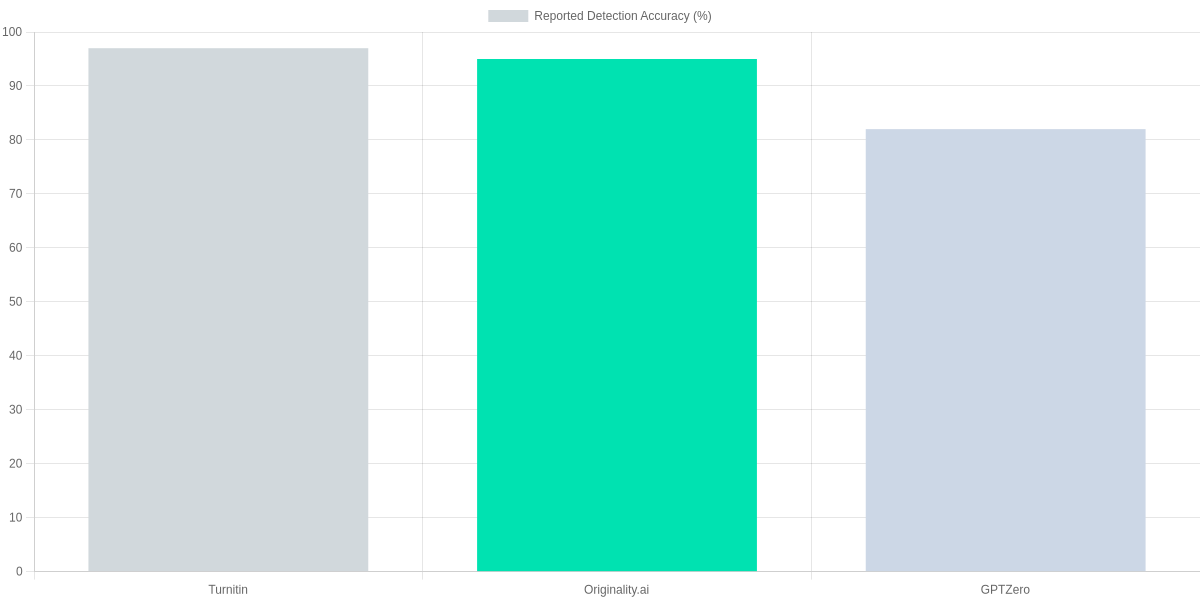
Neural detectors—classifiers trained on labeled AI and human text—look for artifacts in token distributions and higher-order patterns. Commercial detectors like Turnitin, Originality.ai, and GPTZero combine classifier outputs with heuristics.
The bar chart below summarizes reported detection accuracy claims from those vendors, which you should interpret cautiously because datasets and model versions differ widely.
Watermarking and provenance signals:

Watermarks embed subtle token patterns or metadata that are provable when present, but most public content lacks a reliable watermark standard. Provenance metadata (signed origins) is stronger, yet adoption across publishing platforms is limited.
If a watermark is present, detection can be near-deterministic; absent watermarks, you fall back to probabilistic signals which produce false positives and negatives.
Ensembles and realistic expectations
Ensemble approaches—combining perplexity checks, model classifiers, and human review—lift precision. For instance, pairing Originality.ai or Turnitin outputs with manual inspection reduces false positives on technical or formulaic writing.
| Feature | Turnitin (AI Writing Detection) | Originality.ai | GPTZero |
|---|---|---|---|
| Primary method | Proprietary ML classifier + database matching | Model-based classifier + plagiarism check | Perplexity & burstiness + model classifier |
| API / integrations | LMS integration; limited API | API and WordPress plugin | API available (paid) |
| Plagiarism detection | Yes (Turnitin database) | Yes (integrated) | No — focused on AI signals |
| Pricing (approx) | Institutional licensing (varies) | Subscription: plans from ~$20/mo | Freemium + paid Pro plans |
| Watermark detection | No (not watermark-focused) | No | No |
Expect trade-offs: high reported accuracy often masks dataset bias and model-version differences. You should combine automated scores with manual review for contentious cases to reduce both false positives on technical text and false negatives on edited model output.
Tools Comparison: Popular Detectors and Features
You need clear, actionable comparisons when choosing a detector. This review focuses on Turnitin, GPTZero, Copyleaks, and Originality.ai—each targets different use cases, from academic integrity to publisher workflows. Below are the practical trade-offs you should weigh.
At-a-glance market context
Usage is concentrated around a few leaders: Turnitin dominates institutional detection in education, GPTZero is widely used by educators and journalists for quick checks, Copyleaks is favored by publishers and legal teams for bulk workflows, and Originality.ai is popular with SEO and content teams. The distribution below gives a rough sense of adoption across sectors and can help you prioritize which tools to trial.
Side-by-side feature comparison
The table below covers detection approach, accuracy signals, API and batch support, privacy guarantees, and entry-level pricing. You’ll see where each product is strongest and where compromises exist.
| Feature | Turnitin (AI Writing Detection) | GPTZero | Copyleaks | Originality.ai |
|---|---|---|---|---|
| Detection approach | Proprietary multi-metric model, trained on academic data | Statistical perplexity + burstiness heuristics | Hybrid classifier with watermark and linguistic analysis | Classifier + plagiarism checks, SEO-focused |
| Accuracy notes | Strong on student essays; tuned to education datasets | Good for short-form and student work; can flag high-quality human writing | Balanced for publishers; lower false positives than GPTZero in some tests | Good for web publishers; integrates plagiarism and AI scores |
| API & Batch | Enterprise API and LMS integrations; batch uploads for institutions; pricing by seat | Paid API and bulk analysis available; free tier limited | API with pay-as-you-go; bulk file uploads; developer docs available | API and bulk scan options; plans for agencies and sites |
| Privacy & Data Retention | Data retained per institutional agreements; typically not used to train models | States not used for training; retention depends on plan | Offers data retention controls; enterprise DPA available | Claims no training on customer data; retention options on paid plans |
| Pricing (tiers) | Institutional pricing; education licenses from ~$3k/yr upwards | Freemium + paid tiers (~$10–$50/month for advanced) | Subscription and credits; small teams ~$20–$100/month | Subscriptions aimed at publishers; ~$29–$199/month depending on volume |
Practical considerations and interpreting scores
For batch analysis and automation you’ll care most about API stability, rate limits, and cost per query. Turnitin and Copyleaks are more enterprise-oriented, while GPTZero and Originality.ai are easier to pilot for individual users. Test with representative samples before committing to a plan.
Detector scores are probabilistic, not definitive. Treat high-confidence flags as a trigger for manual review rather than automatic removal. Combining tools reduces false positives: you can use a high-sensitivity detector first, then a lower-sensitivity one as a confirmatory check.
1️⃣
Evaluate Accuracy
Run sample texts through GPTZero, Turnitin, Copyleaks to compare false positives and false negatives.
2️⃣
Check Privacy Policies
Confirm data retention and whether text is stored or used for model training (important for sensitive content).
3️⃣
Test Batch & API
Verify bulk upload limits, API rate limits, and pricing for scale (Originality.ai and Copyleaks offer APIs).
4️⃣
Interpret Scores
Translate confidence scores into actions: manual review thresholds, combined-tool voting, or outright rejection.
5️⃣
Combine Tools
Use a primary detector plus a secondary check (statistical + watermark) to reduce risk.
Practical Step-by-Step Detection Checklist
Detection Checklist Visual
Quick Triage
Scan for style shifts, repeated phrases, and odd vocabulary; flag anything that reads ‘too consistent’ or unnaturally formal.
Automated Scan
Run GPTZero, Copyleaks, Originality.ai, and Turnitin Authorship; note detector scores and confidence ranges.
Metadata Review
Use ExifTool, Google Docs Version History, or Git log to inspect timestamps, authorship, and edit patterns.
Contextual Validation
Cross-check claims via Google Search, Crossref, PubMed, and the Wayback Machine; verify quoted sources and DOIs.
Interpret Results
Compare detector outputs—look for consensus, not single-tool verdicts; treat low-confidence scores as inconclusive.
Escalate & Document
If uncertainty remains, escalate to an editor or forensic linguist; record tools used, outputs, and reasoning in a report.
You should begin with a quick triage: read several passages for style inconsistencies, repeated phrases, and unusual factual errors. Note abrupt tone shifts or sentences that feel mechanically polished; these are common signs of model output.
Automated checks
Run multiple detectors—GPTZero, Copyleaks, Originality.ai, and Turnitin Authorship—rather than relying on one. Paste representative excerpts, use batch uploads when available, and capture reported scores and confidence intervals.
Also try GLTR for token‑level anomalies and Hugging Face community detectors for a second opinion. Treat any single high-probability flag as a signal to probe further, not as definitive proof.
Metadata & revision history
Inspect file metadata with ExifTool, review Google Docs Version History, and check Git commit logs or Word Track Changes for suspiciously short edit timelines. Timestamps that show large blocks of content added in one session can be indicative.
Contextual validation
Cross-check claims using Google Search, Crossref, PubMed, and the Wayback Machine. Verify quoted sources, DOIs, and that URLs actually support the claimed facts; AI text often fabricates plausible‑looking citations.
Interpretation, escalation & documentation
Compare outputs across tools and look for consensus. If results conflict or remain inconclusive, escalate to an editor, academic integrity team, or forensic linguist such as those using Turnitin Investigations. Document every step: tool names, screenshots, raw scores, search queries, and your reasoning.
Pros and Cons of AI-Generated Content and Detectors
You’ll find AI writing boosts efficiency and scales content pipelines rapidly. Tools such as OpenAI GPT-4 and Jasper accelerate idea generation and maintain consistent tone across formats.
Generator vs Detector Snapshot
OpenAI GPT-4
High-throughput content generation for drafts, outlines, and headlines.
- • Efficiency: fast drafts and idea generation
- • Scalability: produce large volumes consistently
- • Tone control: maintain brand voice across articles
Originality.ai
AI-detection focused on plagiarism and synthetic text signals.
- • Screening: flags suspected AI-written passages
- • Integration: API for batch checks and workflows
- • Limitations: false positives and model sensitivity
Pros
- Efficiency: faster draft turnaround for blogs and email.
- Content scaling: produce more articles with fewer writers.
- Idea generation: rapid topic angles, outlines, and headlines.
- Consistency checks: style and terminology enforcement across content.
Cons
- Hallucinations: invented facts requiring human verification.
- Potential bias: models reflect biased training data, needing editorial oversight.
- Ease of misuse: cheap spam, academic dishonesty, and misinformation.
- Imperfect detection: Originality.ai, GPTZero, and Turnitin can false-flag or miss AI text.
You should deploy detectors like Originality.ai or Turnitin as part of a layered review, not as sole judges. Use them for risk-based screening, editorial prioritization, and training rather than as definitive proof.
Best-fit: high-stakes publishing, academic submissions, and regulatory reporting where provenance matters. Set realistic expectations: aim for improved workflow efficiency, not perfect binary classification. Combine detectors with human editors for balanced risk control. Expect ongoing tuning and policy alignment.
Frequently Asked Questions
FAQ Accordion
Can AI-generated content be detected with 100% certainty?
▼
Which detection method is most accurate: classifier, watermark, or human review?
▼
How should I interpret a detector’s score or probability?
▼
Are there reliable ways to detect AI-generated images and videos?
▼
Can paraphrased or edited AI text evade detectors?
▼
What privacy concerns exist when submitting content to online detectors?
▼
Should institutions ban AI-generated content or regulate its disclosure?
▼
As a reviewer, you should treat outputs from GPTZero, OpenAI Classifier, Turnitin, and Originality.ai as guidance rather than final judgments. Scores are probabilistic; combine classifier results with human review and metadata checks like file timestamps and EXIF.
For images and video, rely on Adobe Content Credentials, Truepic, and Deepware Scanner but expect false negatives. If privacy matters, avoid uploading sensitive drafts to Turnitin or Originality.ai—use local tools or self-hosted Hugging Face models instead.
Policy note
You should favor disclosure policies and targeted detection over blanket bans; many institutions combine Turnitin policies, GitHub Copilot rules, and integrity training to manage risk.
Conclusion
You can’t rely on a single detector: effective How to Detect AI-Generated Content combines automated models, metadata checks, stylistic analysis, and human judgment. Tools such as GPTZero, Turnitin Authorship Investigate, Copyleaks, and Hugging Face detectors accelerate screening but produce imperfect scores you must interpret.
🎯 Key Takeaways
- → No single silver-bullet: combine automated detectors, metadata checks, and human review.
- → Adopt a checklist and integrate tools like GPTZero, Turnitin Authorship Investigate, and Copyleaks into your workflow.
- → Set clear policies, train reviewers, and treat detector outputs as advisory, not definitive.
Pros and Cons
- Pros: Rapid initial triage with GPTZero and Copyleaks; Turnitin integrates with LMS for institutional workflows; Hugging Face offers customizable models.
- Cons: False positives and false negatives remain common; savvy actors can obfuscate metadata or paraphrase; detectors should not be sole evidence in disputes.
Next steps: adopt a compact checklist that includes source verification, author metadata audit, and stylistic outlier detection. Choose tools that match your review scale — Copyleaks for batch scanning, Turnitin for academic settings, GPTZero or Hugging Face for spot checks — and codify escalation policies so reviewers know when to pause publication.
TL;DR: This review evaluates methods and practical tools for detecting AI-generated text, images, audio, and video—testing detectors like GPTZero, Originality.ai, Turnitin, CopyLeaks, and OpenAI’s classifier—and explains how linguistic analysis, metadata checks, watermarking, and model-fingerprint approaches work. It summarizes pros/cons, accuracy caveats, and failure modes and provides a hands-on checklist recommending tool combinations and when to escalate to human forensics so publishers, educators, and compliance teams can triage content reliably.
Ultimately, while AI technology makes our work easier, it is our responsibility to maintain the transparency and authenticity of the content. There is no substitute for human creativity for a successful blog or website. Using the methods and tools we have discussed in this guide, you can easily identify AI content and control the quality of your own content. Remember, using AI as a tool is good, but having a human touch in the content is the key to long-term success. How did you like our review guide? If you have any AI detectors of your choice, don’t forget to let us know in the comments!

I ‘m Md. Osman Goni > Founder of SearchAIFinder and an AI content specialist. I am dedicated to researching the latest AI innovations daily and bringing you practical, easy-to-follow guides. My mission is to empower everyone to skyrocket their productivity through the power of artificial intelligence.”
💬 We’d Love to Hear From You!
Which of these AI tools are you excited to try first? Let us know in the comments below!