
How to Integrate an AI Chatbot on Your Site (Easy Guide)
How to Integrate an AI Chatbot on Your Site (Easy Guide), Nowadays, a website is not just a place to provide information, but also a way to communicate with your customers. But can you always be online and answer everyone’s questions? Of course not! This is where an AI Chatbot comes in handy. 🤖✨
In today’s detailed guide, I will show you how to add a powerful AI chatbot to your website very easily and without any coding knowledge. It will not only save you time, but also take your site’s user experience to a new level. Let’s get started!
You need fast, conversational support to keep visitors engaged and convert leads. Modern tools like OpenAI’s ChatGPT API, Google Dialogflow, Rasa and Intercom let you add 24/7 assistants that answer FAQs, capture emails, and route complex issues to agents. How to Integrate an AI Chatbot on Your Site becomes a tactical choice between hosted platforms and self-hosted frameworks.
💡
Did You Know?
Did you know many websites rely on OpenAI’s ChatGPT API, Google Dialogflow, Rasa, and Microsoft Bot Framework to handle FAQs, lead capture, and 24/7 support?
Source: Vendor documentation and industry case studies
This guide reviews integration options (ChatGPT API, Dialogflow, Microsoft Bot Framework), outlines a step-by-step setup with SDKs and webhooks, and compares trade-offs: setup complexity, privacy, customization and cost.
You’ll get pros and cons for hosted services versus open-source stacks, plus practical tips on deployment, analytics, and testing so you can pick the right approach for Shopify, WordPress, or a custom React app. Expect to weigh developer time, vendor SLAs and data controls.
Why Add an AI Chatbot to Your Site

Adopting an AI chatbot delivers clear business wins: automated lead capture, ticket deflection, and round‑the‑clock availability. Platforms such as Drift, Intercom, and Zendesk power qualified lead flows while reducing human support load.
▶
Lead capture & qualification
Automate form-fill, calendar booking, and qualify leads with Drift or Intercom integrations.
▶
Support deflection
Deflect common tickets by answering FAQs using Zendesk or Rasa knowledge bases.
▶
24/7 availability
Maintain presence outside business hours with ChatGPT (OpenAI) or Dialogflow agents.
▶
Conversion uplift
Reduce bounce and increase micro-conversions; ManyChat and Tidio excel on e-commerce funnels.
▶
When NOT to use one
Avoid chatbots for complex legal/medical advice or tiny sites where ROI won’t cover setup and maintenance.
You’ll also meet rising user expectations for instant answers and guided journeys. Tools like ManyChat, Tidio, and ChatGPT‑driven assistants frequently boost conversion rates, shorten sales cycles, and reduce cart abandonment on e‑commerce sites.
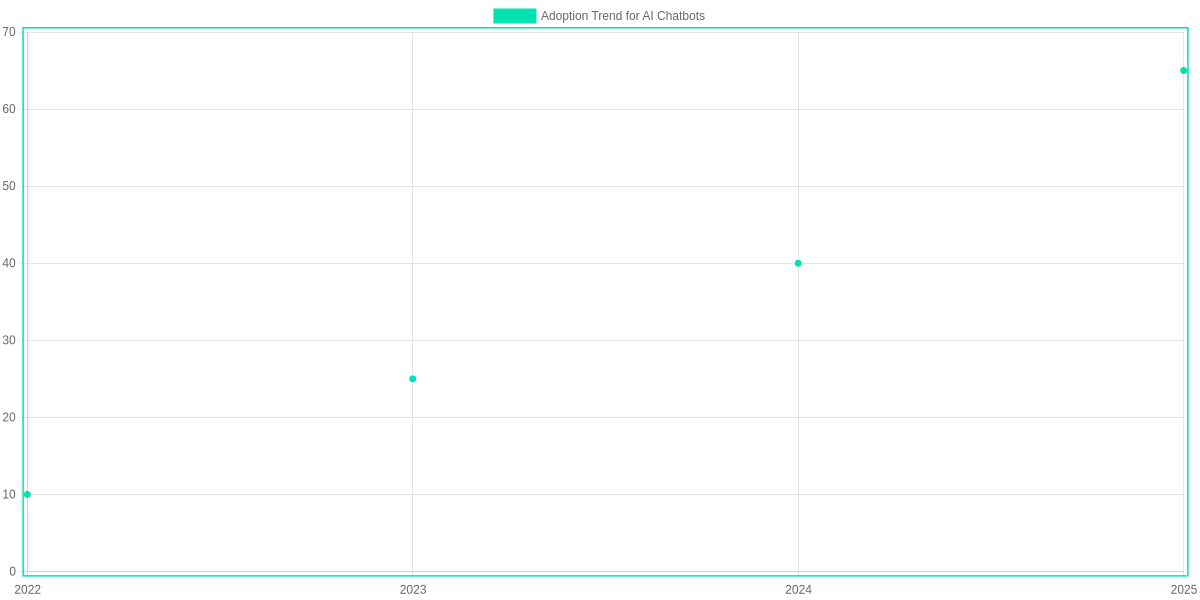
When it’s (and isn’t) right
When it’s appropriate, chatbots handle FAQs, appointment booking, and easy troubleshooting very well. When it’s not appropriate, avoid replacing licensed advice or complex multi‑step workflows that require human judgement.
How to Integrate an AI Chatbot on Your Site is primarily a decision about tradeoffs: prioritize support deflection metrics, estimated lead volume, and data control.
For data‑sensitive businesses consider Rasa or Dialogflow on private infra; for faster time to market choose Intercom, Drift, or Tidio. Your choice will determine integration effort, ongoing costs, and expected ROI.
Measure impact with defined KPIs: qualified leads per month, support tickets deflected, average response time, and conversion lift. Use analytics from Google Analytics, Intercom reporting, or custom dashboards to attribute value. Run split tests on messaging, CTA placement initially during the first ninety days.
Popular Platforms Compared
Which Platform Fits Your Site?
Quick guide to match platform strengths with your needs: marketing bots, support automation, or custom AI assistants.
- ✓ Marketing: ManyChat / Intercom
- ✓ Support: Dialogflow / Intercom
- ✓ Custom AI: Rasa / OpenAI API
You’ll pick a chatbot platform based on trade-offs between setup speed, customization, NLP quality, integrations and long-term cost. ManyChat and Intercom prioritize rapid deployment for marketing teams; Dialogflow balances ready-made NLU with Google Cloud features; Rasa demands engineering but gives full control; OpenAI API delivers the most natural language quality but adds token costs and prompt tuning work.
Ease of setup varies: Intercom and ManyChat provide visual builders that get you live within hours, Dialogflow offers a web console and intent templates for moderate effort, Rasa requires Python and deployment knowledge, and OpenAI integrations need API wiring and prompt engineering. Customization follows the inverse curve: Rasa and OpenAI let you shape behavior at code and model levels, Dialogflow supports fulfillment webhooks, and ManyChat focuses on flow-based sequences.
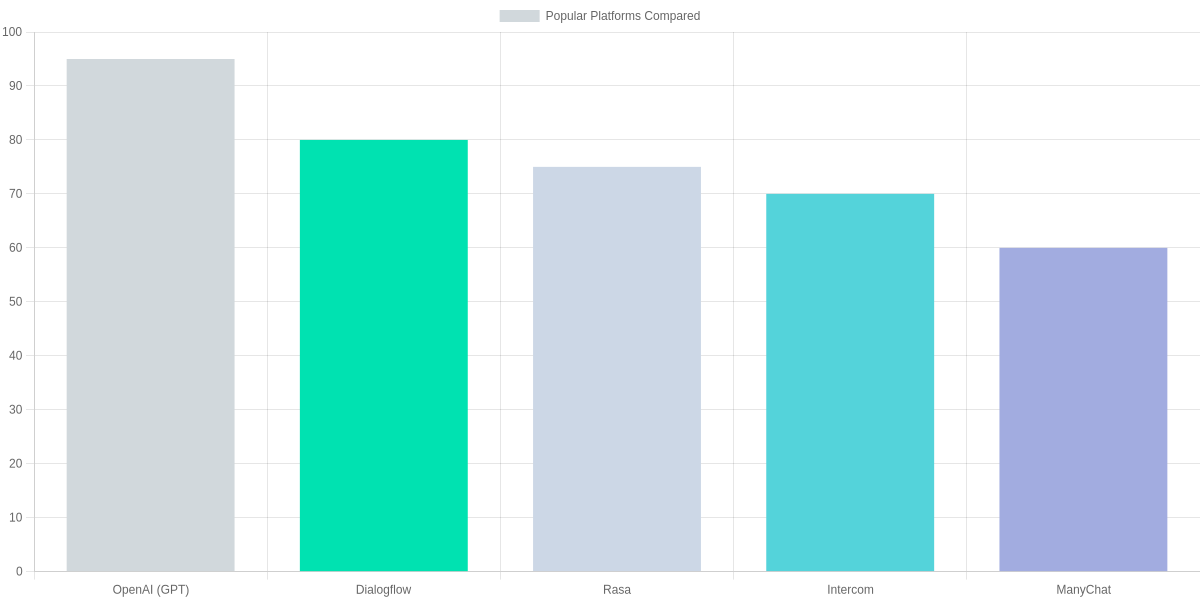
NLP quality is highest with OpenAI models for generative understanding, Rasa performs strongly when you train task-specific models, and Dialogflow is reliable for intent classification with prebuilt entities. Integrations matter: Dialogflow plugs into telephony and Google Cloud services; Intercom and ManyChat connect directly to CRM, email and social channels; Rasa and OpenAI require middleware but work with anything.
| Feature | Dialogflow (Google) | Rasa (Open‑Source) | OpenAI API (GPT) |
|---|---|---|---|
| Ease of setup | Easy — web console, intent builder | Developer‑heavy — Python & CLI | Moderate — REST API integration, SDKs |
| Customization | Moderate — webhooks, fulfillment | Very high — full code control | High — prompt engineering + fine‑tuning |
| NLP quality (typical) | Good (prebuilt ML models) | High for tuned models | State‑of‑the‑art (large LLMs) |
| Integrations | Google Cloud, Telephony, Dialogflow CX/ES | Custom connectors; community SDKs | Any app via API; SDKs & wrappers |
| Pricing (entry) | Free tier; pay‑as‑you‑go on Google Cloud | Open‑source free; enterprise plans available | GPT‑3.5: ~$0.002/1K tokens; GPT‑4 higher (see vendor) |
Pros and Cons
- Intercom/ManyChat — Pros: fastest time-to-market, native channel connectors, non-engineer friendly. Cons: limited deep NLP, recurring subscription fees.
- Dialogflow — Pros: Google NLU, telephony and cloud integrations. Cons: less flexible than code-first approaches, complex pricing at scale.
- Rasa/OpenAI — Pros: maximum customization and NLP quality. Cons: engineering overhead, hosting and token costs.
Match your choice to team skills and expected scale. Budget for production testing and monitoring now.
Step-by-Step Integration Process
You should start by translating business goals into measurable KPIs: conversions, containment rate, average response time, and ticket deflection. Define the chatbot’s conversation scope clearly — e-commerce checkout, lead qualification, or Tier-1 support — and assign owners for each KPI in Salesforce or HubSpot.
Prioritize compliance and data flow. If you handle PII or regulated data, factor in self-hosting options on Google Vertex AI or private deployments with Anthropic models. For lower friction, evaluate managed platforms like Intercom, Drift, or Tidio which include widgets and built-in analytics.
Integration Steps
🎯
Define Goals & KPIs
Set conversion, containment, and response time KPIs. Map chat scope to lead capture, support, or e-commerce using examples like reducing ticket volume by 30%.
🏗️
Choose Platform & Hosting
Decide between self-hosting with OpenAI/Anthropic models on Google Vertex AI or a managed provider like Intercom, Drift, or Tidio. Consider costs, compliance, and required integrations.
🔗
Plan Integrations
Inventory systems: Salesforce or HubSpot CRM, Zendesk helpdesk, Google Analytics/GA4, and Mixpanel for behavior tracking. Define data flows and webhooks.
🧩
Prototype Conversation Flows
Build intents and sample dialogs in Botpress, Rasa, or Dialogflow CX. Create edge-case handling and fallback messages.
🧠
Train & Configure Models
Fine-tune with OpenAI or Anthropic, set system prompts, and map intents. Upload FAQs and knowledge base from Zendesk or Confluence for retrieval-augmented generation.
🧪
Test & QA
Run scripted tests with Botium, perform A/B testing, and gather qualitative feedback via user sessions. Validate privacy and rate limits.
🚀
Deploy & Integrate Widget
Install web widget via Intercom/Drift/Tidio snippet or custom React component. Secure API keys with Vault or GitHub Actions secrets.
🔄
Monitor & Iterate
Track metrics in Datadog, Sentry, and GA4. Retrain intents, adjust prompts, and roll improvements through CI/CD for continuous optimization.
Implementation Stages
Prototype with Botpress, Rasa, or Dialogflow CX to validate flows before model training. Use a small test corpus from Zendesk transcripts to seed intents and sample utterances.
Train using OpenAI fine-tuning or Anthropic if you need controlled responses. For retrieval, index Confluence or your Zendesk KB and serve context with a RAG layer.
- Testing: automate with Botium, run load tests and privacy audits.
- Deployment: embed Intercom/Drift/Tidio snippets or a React widget and secure keys in Vault/GitHub Actions.
- Monitoring: feed events to Datadog, Sentry, and GA4 to measure SLA and UX metrics.
Monitoring and Iteration
Post-launch, review transcripts weekly and adjust intents based on false positives and handoffs. Use Mixpanel or GA4 funnels to measure conversion impact and Datadog for error spikes.
Your ongoing cadence should include prompt tuning, retraining monthly, and a rollback plan for model regressions. Continuous CI/CD for models and content will keep the chatbot aligned with product and support changes.
Customization, UX and Best Practices
You should design conversational flows that map core intents and state transitions, favor short prompts, and define explicit fallback handlers and escalation triggers to human agents via LivePerson or Zendesk Support. Prototype flows in a sandbox before production.
Set a consistent tone and personality using Microsoft Bot Framework or custom prompts. Test voice with real users and include WCAG 2.1 compliance, ARIA labels, keyboard navigation and descriptive alt text.
Quick Best-Practice Steps
Design Conversational Flows
Map intents in Dialogflow or Rasa; include clear fallbacks and escalation paths to LivePerson or Zendesk Support.
Set Tone & Accessibility
Choose a voice (e.g., friendly vs. formal) in Microsoft Bot Framework; ensure WCAG 2.1 compliance and alt-text for images.
Personalization & Privacy
Use Segment or mParticle for personalization; anonymize PII and follow GDPR/CCPA; limit retention in OpenAI and Anthropic API calls.
Performance & Handoff
Optimize response time with caching and AWS Lambda warmers; route complex queries to agents in Salesforce Service Cloud.
Personalize with Segment or mParticle to prefill context but anonymize identifiers and obtain explicit consent. Enforce retention limits when calling OpenAI or Anthropic APIs to stay GDPR/CCPA compliant.
Tune performance by caching frequent replies, using AWS Lambda warmers, and monitoring latency and error rates in Datadog or New Relic. Define clear handoff rules: classify complex intents, attach conversation history, and escalate to Salesforce Service Cloud agents when confidence scores drop below your threshold.
You should run A/B tests with Optimizely, analyze session replays in FullStory, and iterate on prompts based on conversion metrics. Keep bot copy concise, give quick reply buttons, and provide ‘speak to agent’ option. Document fallback patterns and update training data in Rasa or Dialogflow to reduce failures. Measure CSAT, NPS and resolution time continuously via dashboards daily.
Costs, Pricing and Expected ROI
Typical cost components include platform fees (Dialogflow CX, Intercom, Zendesk), hosting and infrastructure (DigitalOcean, AWS), development and integration (engineer hours to connect CRM and webhooks), and ongoing maintenance (monitoring, model updates, fine-tuning with OpenAI or Anthropic). Implementation scope drives the split between SaaS licensing and custom development.
Deployment comparison
Dialogflow CX (Google Cloud)
Managed NLU with tiered session pricing and built-in integrations. Good for teams wanting low-maintenance deployments.
- • Platform fee: session-based pricing
- • Low-code flow builder
- • Integrated analytics & contact-center connectors
OpenAI + Botpress on DigitalOcean
Custom LLM pipelines using OpenAI API with Botpress UI; higher developer and hosting costs but full control and fine-tuning.
- • API token costs (OpenAI)
- • Self-hosted droplets on DigitalOcean
- • Ongoing fine-tuning and monitoring expenses
Estimating ROI
Use saved agent hours, conversion lift, and lead velocity to model ROI. If your bot saves 200 agent hours/month at $25/hr, that’s $5,000 monthly savings. Add conversion lift — a 2% uplift on a $50K monthly revenue stream is $1,000/month. Combine reduced support cost and incremental revenue to estimate payback.
Budgeting tips
- SMBs: prefer Intercom, Tidio, or Dialogflow Essentials to limit upfront dev; cap API usage and use templates.
- Enterprise: plan for fine-tuning (OpenAI/Anthropic), SRE, SOC2 compliance, and 6–12 month ROI horizons.
Pros and Cons
🚀
Important Insight
Balance generative quality and data control: OpenAI delivers the most natural conversations, Google Dialogflow speeds up intent-driven flows, and Rasa offers full on‑premise data ownership. Plan monitoring and privacy controls before you launch.
You’ll get faster support and round‑the‑clock engagement when you add a chatbot like OpenAI ChatGPT API, Google Dialogflow CX, or Rasa. Each option trades off language quality, integration speed, and data control. Review these pros and cons to choose the right mix for your site.
Pros
- Improved UX and conversions — GPT‑powered replies (OpenAI) feel most human.
- Quick intent routing and multichannel connectors with Dialogflow.
- Full data ownership and on‑premise compliance using Rasa.
- Lower live‑agent load and faster response times.
Cons
- Wrong bot behavior: hallucinations or off‑topic replies from LLMs.
- Privacy/regulatory risks: cloud offerings send data to third parties; GDPR implications.
- Maintenance overhead: ongoing training, monitoring, and content updates (especially for Rasa).
- Costs: OpenAI token spend or hosting and DevOps for Rasa at scale.
Mitigate major risks by adding human‑in‑the‑loop escalation, input/output filters, strict logging and retention policies, a Data Processing Agreement (DPA), and regular end‑to‑end testing.
| Feature | OpenAI ChatGPT API | Google Dialogflow CX | Rasa Open Source |
|---|---|---|---|
| Response quality | State‑of‑the‑art conversational LLMs (GPT‑4 family) — best generative replies | Strong intent/entity NLU; less freeform generation than LLMs | Depends on custom models; excels at intent classification, not generative by default |
| Privacy / hosting | Cloud‑hosted; enterprise data controls available, but data leaves your infra | Cloud‑hosted on Google Cloud; subject to Google Cloud policies | Self‑hosted on‑premise or private cloud — full data control |
| Integration complexity | Simple HTTP API for chat; you must build orchestration and UI | Low‑code console, SDKs and built‑in connectors | Higher engineering overhead; Python framework and deployment work |
| Cost model | Pay‑as‑you‑go token pricing; can be costly at scale | Free tier + paid editions on usage; predictable GCP billing | Open‑source: no license fees, but hosting/maintenance costs apply |
| Best fit | Generative assistants, complex conversation flow, rich language | Intent-driven bots with multichannel integrations | Privacy‑sensitive or highly customized bots with full control |
Frequently Asked Questions
These FAQs address practical concerns when adding a chatbot to your site, referencing platforms like Intercom, Drift, Tidio, OpenAI GPT-4, Rasa, and Zendesk. The answers focus on timeline, staffing, privacy, metrics, and realistic expectations for implementation.
Plug-and-play widgets such as Intercom, Drift, and Tidio typically install in under an hour and can be tuned the same day. Prototypes built with OpenAI GPT-4 or Microsoft Bot Framework usually take 1–7 days, while production-ready integrations with auth, analytics, and backend hooks often require 2–6 weeks. On-premise Rasa deployments add time for infrastructure and testing.
Common integration FAQs
How long does it take to integrate an AI chatbot?
▼
Do I need developers to add a chatbot to my site?
▼
How do chatbots handle user privacy and data?
▼
What metrics should I track after launching a chatbot?
▼
Can a chatbot replace human support entirely?
▼
What are the pros and cons of adding a chatbot?
▼
No-code builders let support or marketing ship flows without engineers, but expect developer involvement for API access, SSO, or database lookups. Fine-tuning models or integrating with CRMs will require engineering time for prompt design and secure API usage.
Privacy choices matter: Intercom and Zendesk offer GDPR tools and retention controls, Azure Bot Service supports enterprise compliance, and OpenAI’s enterprise terms can limit training on customer data. Monitor containment rate, CSAT, escalation/fallback frequency, first-response time, and conversion rate; export logs to Mixpanel, Google Analytics, or Looker for analysis.
Pros and Cons
- Pros: 24/7 availability reduces response latency and improves lead capture.
- Pros: Lower cost-per-resolution compared with full human coverage.
- Pros: Actionable KPIs available in Drift, Intercom, or Zendesk analytics.
- Cons: Custom bots require maintenance and developer time.
- Cons: Privacy and compliance work are necessary for sensitive data.
- Cons: Poor fallback flows frustrate customers unless escalation to Zendesk agents is seamless.
Start with a hosted widget like Intercom or Tidio to validate customer flows, then evolve to a GPT-4 or Rasa-backed system as needs grow. Benchmark containment and CSAT before expanding into billing or legal automations to avoid compliance creep. Plan regular audits of prompts, analytics, and privacy settings, and schedule quarterly reviews with engineering and support.
Conclusion
🎯 Key Takeaways
- → Choose OpenAI (ChatGPT) or Dialogflow for fast integration; use Rasa for on-premises control.
- → Prioritize secure hosting, GDPR compliance, and clear fallback paths to human agents.
- → Launch a phased pilot: analytics, tweak intents, scale to full production.
This review of How to Integrate an AI Chatbot on Your Site shows you can use OpenAI (ChatGPT) or Google Dialogflow for rapid deployment, or choose Rasa for on-premises control. Intercom and Zendesk work well for routing to agents.
Prioritize secure hosting, GDPR compliance, and monitoring. Start with a small pilot, measure intent accuracy, then scale.
Track CSAT, intent accuracy, and resolution rate with Google Analytics or Mixpanel during the pilot. Budget for OpenAI token usage and Intercom seat fees in your roadmap.
Pros
- Fast setup with ChatGPT or Dialogflow
- Custom control on Rasa; strong enterprise routing with Intercom
- Improves response time and collects user insights
Cons
- Privacy/config complexity for on-prem or GDPR
- Costs for OpenAI API or Intercom subscriptions
- Requires ongoing training and human fallback
Next steps — Quick checklist
- Choose stack (ChatGPT / Dialogflow / Rasa)
- Define intents, entities, and fallback flows
- Run a 2–4 week pilot and review analytics
- Roll out gradually and monitor KPIs
TL;DR: AI chatbots—via OpenAI’s ChatGPT API, Google Dialogflow, Rasa, Microsoft Bot Framework or hosted platforms like Intercom, Drift and Tidio—can boost lead capture, deflect support tickets and provide 24/7 engagement. Choosing between hosted services and self‑hosted frameworks is a trade‑off of setup complexity, privacy, customization and cost, so measure impact with KPIs (qualified leads, ticket deflection, conversion uplift) and avoid chatbots for complex legal/medical advice or very small sites. For data‑sensitive businesses prefer Rasa or private Dialogflow deployments; for fastest time‑to‑market pick Intercom/Drift/Tidio.
“In conclusion, there is no substitute for an AI chatbot to make your website smart and modern in 2026. Using the methods we have seen today, you can easily introduce automation to your site. 🚀
Remember, keeping up with technology is the key to success. If you face any problems while setting up a chatbot, don’t forget to let me know by commenting below. I am always here to help you. Happy blogging!”
“What AI Chatbot are you planning to use? 🤔🤖
If you have any questions about the setup process or need help choosing the right tool for your niche, feel free to drop a comment below! ✍️👇 I’d love to hear your thoughts and help you out. 🌟
Don’t forget to share this guide with your fellow bloggers! 🚀📲”

I ‘m Md. Osman Goni > Founder of SearchAIFinder and an AI content specialist. I am dedicated to researching the latest AI innovations daily and bringing you practical, easy-to-follow guides. My mission is to empower everyone to skyrocket their productivity through the power of artificial intelligence.”
💬 We’d Love to Hear From You!
Which of these AI tools are you excited to try first? Let us know in the comments below!