
The ROI of AI: How Much Can Your Business Save in 2026?
ROI of AI, In this rapidly changing business world of 2026, artificial intelligence or AI is no longer a luxury but a key tool for survival. Many entrepreneurs think that investing in AI may be too expensive. But did you know that using the right AI tools can dramatically reduce the operational costs of your business? In this article, we will discuss how AI can increase your business’s ROI (Return on Investment) and save you thousands of dollars out of your pocket in the long run.
ROI questions are top of mind for every leader juggling growth targets and tighter margins. Boards now demand clear payback timelines for AI pilots before approving spend, so you need measurable answers fast.
💡
Did You Know?
AI pilots commonly deliver 10–30% cost reductions in back-office operations like finance and customer support.
Source: Industry pilots and vendor reports
You’ll get a practical map to where AI cuts costs: automating back-office tasks with UiPath, reducing support volumes with OpenAI’s GPT-4, and optimizing cloud ETL with Databricks or Snowflake. The review points to AWS SageMaker and Microsoft Azure AI, where managed models lower ops overhead.
I’ll walk you through a clear calculation framework—measure time saved, error reduction, model and cloud spend, then compute payback and IRR. Sample numbers show how a 20% FTE reduction or a 30% decrease in error-related rework converts to concrete savings over 12 months. The ROI of AI: How Much Can Your Business Save?
This review highlights pros and cons with concrete case studies and a worked ROI model for you to replicate.
Why the ROI of AI Matters to Your Business
Quick ROI Checklist
▶
Rising Adoption & Expectations
Tools like OpenAI GPT-4, AWS SageMaker, and Google Cloud Vertex AI are driving faster pilots and higher executive expectations for measurable ROI.
▶
Budgeting & Investment Prioritization
ROI projections affect capital allocation between platforms such as Microsoft Azure OpenAI Service and DataRobot versus traditional IT upgrades.
▶
Stakeholder Buy-In
Finance, operations, and product teams require clear payback timelines and links to KPIs before approving tools like UiPath or C3.ai.
▶
Key Metrics to Track
Track cost-per-unit, time saved (hours or FTEs), error reduction rate, and churn impact to quantify returns.
Adoption of AI is accelerating across industries; leaders increasingly pilot models from OpenAI GPT-4, AWS SageMaker, and Google Cloud Vertex AI, expecting measurable business impact. That pressure makes The ROI of AI: How Much Can Your Business Save? a practical question for finance and product leaders. You need ROI to prioritize spend.
ROI projections shape budgeting—decisions between Microsoft Azure OpenAI Service, DataRobot, or traditional ERP upgrades hinge on expected payback. You’ll need clear timelines, modeled savings, and risk-adjusted forecasts to secure capex. Stakeholder buy-in from finance, ops, and product teams usually demands tool-specific KPIs, especially for automation stacks like UiPath or enterprise AI vendors like C3.ai.
Key Metrics to Track
- Cost-per-unit (before/after)
- Time saved (hours or FTEs)
- Error reduction rate (%)
- Churn impact / revenue retention
Measure ROI with NPV or simple payback-period models tied directly to operational KPIs and run controlled pilots for validation. Use Looker, Tableau, or Amplitude to track before/after metrics and instrument A/B tests for GPT-4 chat assistants or personalization flows. Include cloud cost line-items (AWS, GCP, Azure), labeling, and MLOps via SageMaker or Vertex AI in sensitivity analysis.
Report to finance monthly during pilots. Benchmark vendor SLAs and measure inference cost per 1,000 requests monthly.
Where AI Delivers Hard Cost Savings
You evaluate AI investments on tangible line-item savings: fewer full-time equivalent (FTE) hours, lower error rates, and direct reductions in processing cost. Vendors and case studies consistently place the biggest, fastest wins in four areas — repetitive work, customer service, IT operations, and supply-chain planning — and the numbers you can realistically benchmark against are shown below.
Where AI Cuts Real Costs
AI delivers measurable savings across repetitive processes, customer service, IT operations, and supply chains. These savings show up as reduced FTE hours, fewer errors, and lower processing costs.
- ✓ Repetitive work: 30–50% FTE reduction
- ✓ Customer service: 20–40% ticket deflection
- ✓ Supply chain: 15–30% inventory reduction
Repetitive work (RPA)
Robotic Process Automation platforms such as UiPath typically deliver the most immediate cost reductions for rule-based, high-volume tasks. Benchmarks show 30–50% FTE reductions on invoice processing, employee onboarding, and claims handling. Error rates fall dramatically — often 60–90% — because bots remove manual data-entry mistakes.
Customer service and support
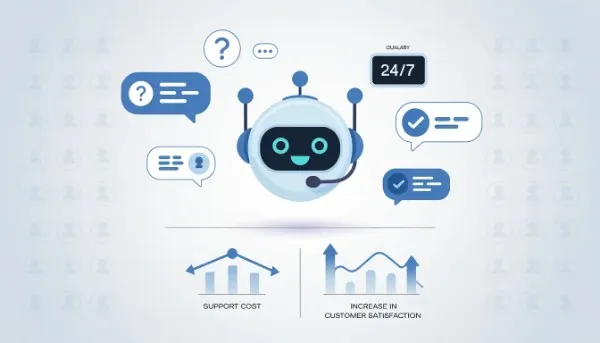
AI-driven systems like Zendesk (Answer Bot, AI-assist) and conversational platforms focus on ticket deflection and agent augmentation. You can expect 20–40% ticket deflection and 15–30% reductions in agent workload when self-service and automated triage are implemented. That translates to $1–$6 saved per ticket in handling and routing costs in many deployments.
IT operations (AIOps)
AIOps tools reduce Mean Time To Repair (MTTR) and manual triage hours. Vendors report MTTR and incident-handling improvements commonly in the 30–50% range for detection and remediation. For you, that means fewer on-call hours and lower incident costs, especially when combined with automation playbooks.
Supply chain optimization
Products such as Blue Yonder show inventory reductions of 15–30% and forecast-error declines of 20–50% in clients that adopt end-to-end demand planning and replenishment. Those gains convert directly to lower carrying costs and fewer stockouts — hard-dollar savings on working capital.
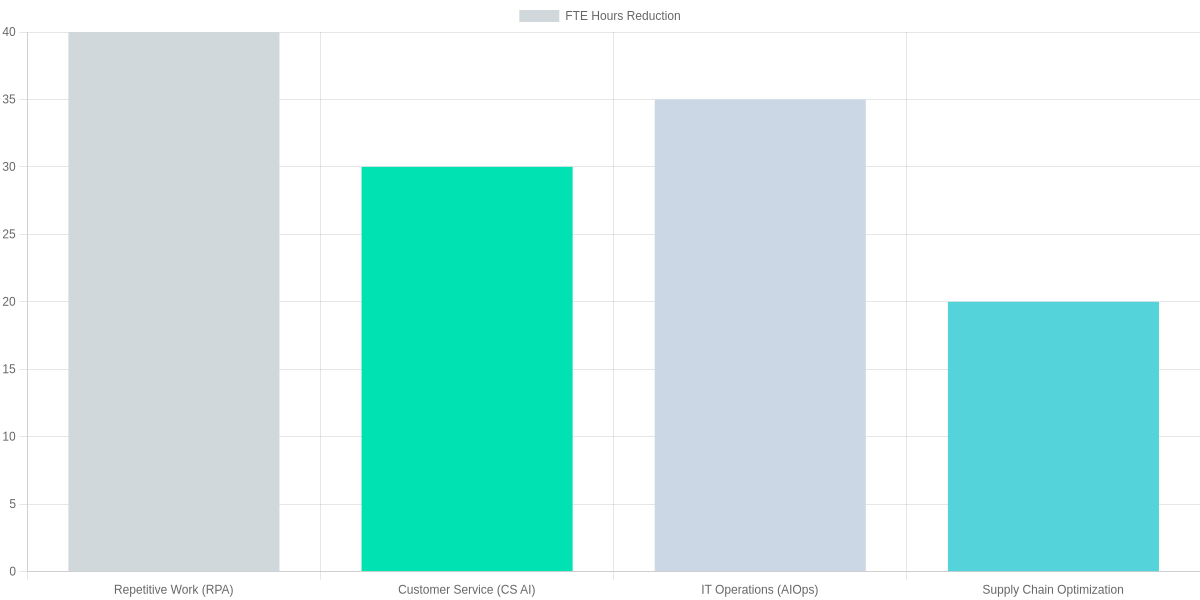
Use the chart above to set expectations: RPA projects average ~40% FTE-hour reductions; customer-service automation ~30%; AIOps ~35%; supply-chain tooling ~20%. Your mileage depends on process maturity, data quality, and scope.
| Feature | UiPath | Zendesk | Blue Yonder |
|---|---|---|---|
| Typical FTE reduction | 30–50% (RPA automates back-office tasks) | 20–40% ticket deflection; 15–30% agent workload reduction | 15–30% inventory reduction; 5–10% service-level lift |
| Error rate reduction | 60–90% (removes manual errors) | 25–50% fewer misrouted or escalated tickets | 20–50% forecast error reduction |
| Processing cost savings | $3–$10 saved per transaction (varying by process complexity) | $1–$6 saved per ticket via deflection and automation | 5–15% lower carrying costs (dollars vary by SKU) |
| Time to value | 3–9 months (pilot to scale) | 1–6 months for automated responses and macros | 6–18 months for end-to-end supply chain improvements |
| Common use cases | Invoice processing, HR onboarding, claims handling | Self-service bots, AI-assist for agents, triage | Demand forecasting, replenishment, route optimization |
When you benchmark potential projects, use these ranges as starting assumptions. For high-volume transactional processes, model towards the upper FTE- and error-reduction ranges. For cross-functional, data-dependent efforts such as supply chain, expect longer time-to-value and phase savings into your financial model rather than upfront line-item drops.
Revenue Uplift and Efficiency Gains From AI
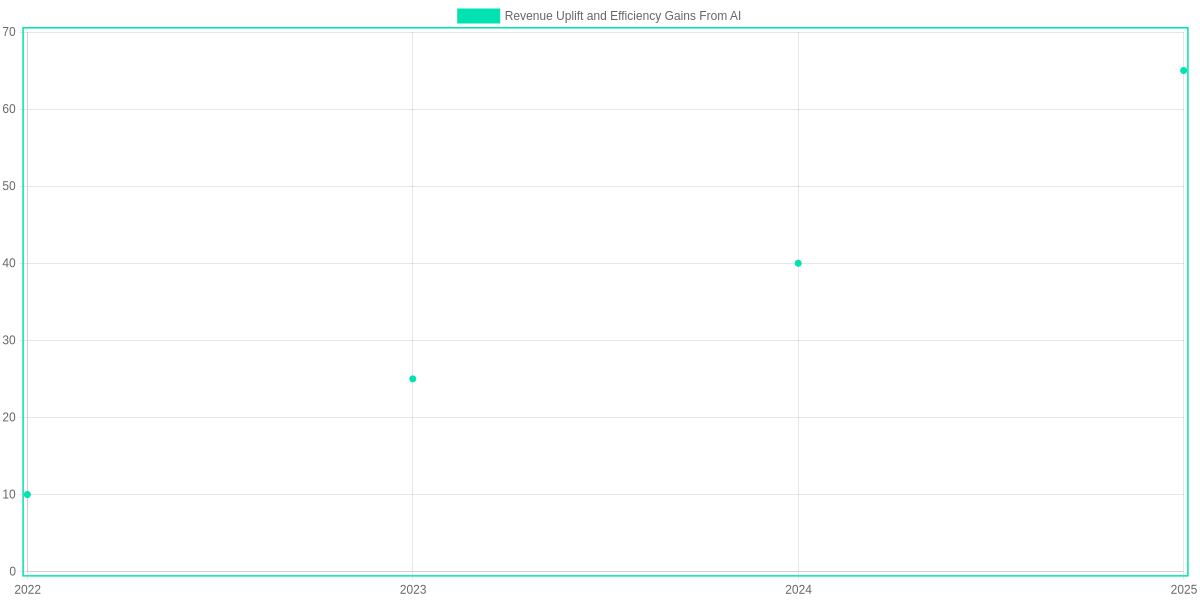
You need clear metrics when evaluating AI investments. Personalization platforms like Dynamic Yield and Salesforce Interaction Studio, smarter pricing engines such as Pricefx and Zilliant, and predictive lead scoring from Salesforce Einstein or HubSpot all target topline growth by boosting conversion rates, increasing average order value, and shortening sales cycles.
Topline uplift: personalization, pricing, and lead scoring
Personalization at scale raises conversion and repeat purchase rates by serving the right offers to the right customers. Dynamic Yield and Salesforce Interaction Studio plug into your CDP to drive higher AOV through curated bundles and real-time recommendations.
Smarter pricing—implemented via Pricefx or Zilliant—captures margin by adjusting price per SKU and channel based on demand signals. Predictive lead scoring with Salesforce Einstein or HubSpot helps sales teams focus on buyers most likely to convert, reducing wasted outreach and lifting win rates.
Measuring efficiency: throughput, cycle time, utilization
Efficiency gains are tangible: you measure throughput, cycle time, and utilization. Use Celonis process mining with Jira or Azure DevOps to baseline cycle time, then deploy UiPath and ABBYY to automate repetitive tasks and reduce processing time.
Higher throughput and lower cycle time increase capacity without proportional headcount growth. Databricks or Snowflake feeding Power BI dashboards lets you track utilization, CAC, and LTV shifts so you can tie operational improvements to unit economics.

Examples of combined cost and revenue impact on net ROI
Work through a concrete example: assume $10M baseline revenue and 40% gross margin ($4M gross profit). A 20% revenue uplift from personalization and pricing raises revenue to $12M and gross profit to $4.8M—an incremental $800k.
If efficiency projects (UiPath automations, Celonis optimizations) cut operating expenses from $2M to $1.7M, that’s an additional $300k improvement to the bottom line. Combined net uplift is $1.1M.
If your AI program costs $300k over the year, a net uplift of $1.1M implies a simple ROI of roughly 367% (net gain/investment). Track these figures in a central analytics stack (Databricks + Power BI) for rolling validation.
Steps to Capture Revenue and Efficiency Gains
1️⃣
Personalization at Scale
Deploy Dynamic Yield or Salesforce Interaction Studio to personalize product recommendations and promo bundles for high-value segments.
2️⃣
Smarter Pricing
Integrate Pricefx or Zilliant with demand-sensing models to implement dynamic price optimization by SKU and channel.
3️⃣
Predictive Lead Scoring
Use Salesforce Einstein or HubSpot’s predictive lead scoring to prioritize sales outreach and shorten win cycles.
4️⃣
Automate Back-Office Workflows
Automate invoice processing and reconciliation with UiPath and ABBYY to cut cycle time and FTE hours.
5️⃣
Measure Throughput & Cycle Time
Combine Celonis process mining with Jira or Azure DevOps metrics to baseline and track throughput improvements.
6️⃣
Monitor Utilization & ROI
Use Databricks or Snowflake for centralized analytics and Power BI for dashboards showing utilization, CAC, and LTV shifts.
How to Calculate AI ROI: Framework and Worked Example
ROI Calculation Steps
Identify Benefits
List revenue uplift, cost savings, productivity gains tied to use cases (e.g., automated claims processing saves FTE hours).
Quantify
Assign $ values, frequency, and probability; use DataRobot or SageMaker pilots to estimate accuracy-driven gains.
Subtract Incremental Costs
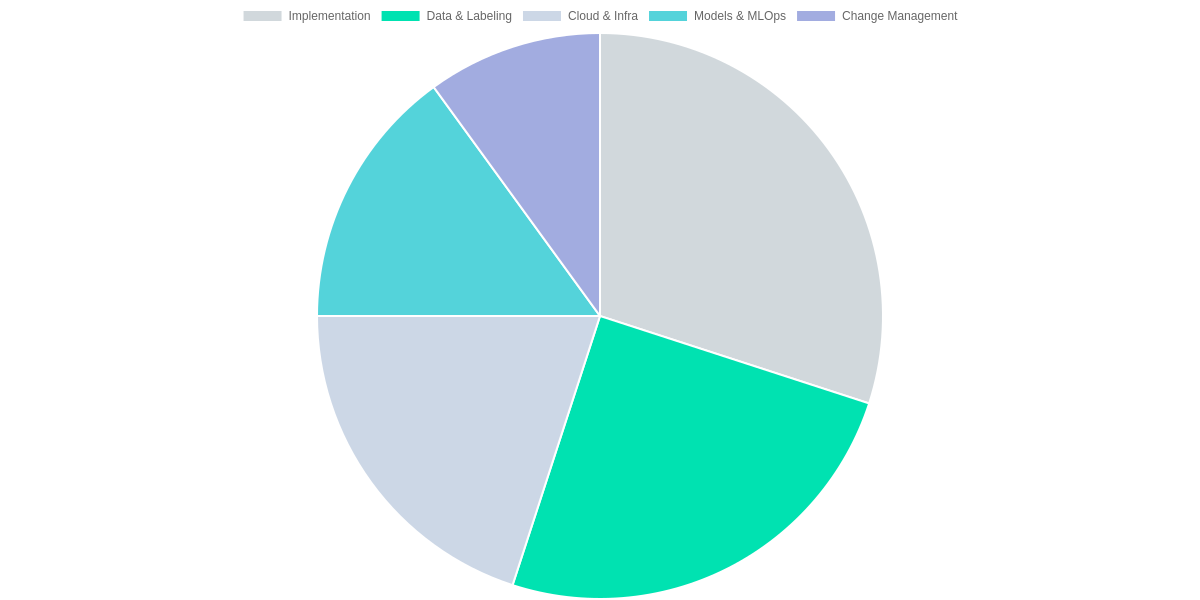
Include implementation, data labeling, cloud (AWS/Google), model development (MLOps), and change management.
Compute Payback & IRR
Calculate simple payback and 3-year IRR for baseline and scenarios; use Excel or DataRobot ROI modules.
Run Sensitivity Scenarios
Create optimistic, base, and pessimistic projections to stress-test assumptions.
You should start by mapping benefits to dollars: reduced headcount, fewer errors, faster turnaround, and new revenue. Quantify frequency and probability (e.g., automated invoice routing cuts 2 FTEs at $80k each = $160k/year). Then enumerate incremental costs: implementation, data labeling, models/MLOps, cloud (SageMaker/Vertex), and change management.
Worked example (3‑year)
Baseline assumptions (k$): Year0 implementation = 250; annual gross benefits = 320 / 480 / 620 over Years 1–3 as adoption scales; recurring costs (cloud+data+ops) = 100/year. Net cash flows (k$): Year0 -250; Year1 +220; Year2 +380; Year3 +520. Cumulative hits breakeven during Year 2 → payback ≈ 1.6 years. 3‑year IRR ≈ 59% (use XIRR in Excel for exact).
Run sensitivity: optimistic (+20% benefits) compresses payback to ~1.3 years and IRR rises (≈75%); pessimistic (-20%) extends payback toward ~2.0 years and IRR falls (≈44%). Use DataRobot or SageMaker pilot data to tighten these inputs.
Platform comparison
| Feature | DataRobot | AWS SageMaker | Google Vertex AI |
|---|---|---|---|
| AutoML Capability | Enterprise-grade AutoML with full-stack explainability | SageMaker Autopilot; modular AutoML tools | AutoML and Vertex AI Workbench with prebuilt pipelines |
| Pricing Model | Subscription + usage for enterprise deployments | Pay-as-you-go with instance and endpoint charges | Pay-as-you-go with BigQuery and endpoint costs |
| Built-in MLOps | Model monitoring, deployment, and drift detection | SageMaker Pipelines, Model Monitor, Clarify | Vertex Pipelines, Model Monitoring, continuous evaluation |
| Data Connectors | Integrates with S3, Snowflake, JDBC | Native AWS services: S3, Redshift, Glue | Strong BigQuery and GCS integration |
| Typical pilot→prod time | 3–6 months (enterprise templates) | 2–4 months (depends on infra expertise) | 2–4 months (fast if using BigQuery/AutoML) |
Pros and Cons: The ROI of AI Reviewed
For many businesses, AI provides clear, measurable automation savings and tangible revenue uplift when applied to the right workflows. Tools like UiPath and OpenAI GPT-4 produce different ROI profiles: UiPath reduces FTE hours in structured processes, while GPT-4 boosts conversion and personalization in customer-facing flows.
Pros
- Measurable automation savings: RPA platforms (UiPath) can cut processing time and headcount for repetitive tasks, producing near-term cost reductions.
- Revenue uplift potential: GPT-4-powered personalization and automated sales outreach often lift conversion rates and average order value.
- Scalability of impact: Cloud services like AWS SageMaker and Google Vertex AI let you scale models across regions and products with centralized governance.
Tool ROI Snapshot
UiPath (RPA)
Robotic Process Automation for repetitive, rule-based tasks. Often yields quick, measurable cost savings through process automation.
- • Fast deployment for back-office tasks
- • Clear time and FTE savings metrics
- • Best for structured data workflows
OpenAI GPT-4
Generative AI for text, summarization, and decision support. Drives revenue uplift via personalization and smarter customer interactions.
- • Improves CX and lead conversion
- • Requires prompt engineering and guardrails
- • High value in content and support automation
Cons and Verdict
Upfront costs for licenses, cloud compute, and data labeling can be substantial, and you should budget for ongoing model maintenance. Change management is a common blocker: staff needs training, and processes often must be redesigned for automation to stick.
There is risk of overpromising—proofs of concept can inflate expectations if you don’t define KPIs. For high ROI, prioritize rule-based automation (UiPath) and targeted GPT-4 pilots in sales or support where uplift is measurable. Lower-priority use cases include broad exploratory pilots without clear KPIs.
Recommended Next Steps
- Run a short pilot with defined KPIs and compare TCO across UiPath, DataRobot, or SageMaker.
- Invest in change management and monitoring; plan model retraining and governance up front.
- Scale only after you validate savings or revenue uplift against baseline metrics.
Frequently Asked Questions
You can often see ROI in 3–6 months for pilots built with UiPath RPA or an OpenAI-powered chatbot (Microsoft Azure OpenAI Service), while DataRobot or Snowflake analytics projects may require 9–18 months. These estimates reflect labor savings, error reduction, and faster cycle times.
FAQ Accordion
How quickly can I expect ROI from AI implementations?
▼
What costs and benefits should I include when calculating AI ROI?
▼
Which functions see the biggest, fastest savings from AI?
▼
Any pitfalls to watch for?
▼
Pros
- Rapid automation gains with UiPath that cut FTE hours.
- Improved customer self-service using Zendesk plus OpenAI GPT agents.
- Accelerated forecasting accuracy via DataRobot and Snowflake.
Cons
- Upfront costs: OpenAI API, DataRobot licenses, and cloud compute.
- MLOps burden: monitoring with MLflow, Grafana, and hidden data debt.
- Risk of vendor lock-in to Snowflake or proprietary model stacks.
When calculating ROI include licensing (OpenAI API, DataRobot), cloud compute (AWS EC2, GCP), integration with MuleSoft, and data labeling. Factor benefits from reduced error rates, faster finance close with BlackLine, and higher conversion using Salesforce Einstein and Adobe Target.
Pilot with clear KPIs tied to Zendesk ticket deflection or UiPath throughput. Use observability tools such as Grafana, MLflow, and Seldon to prevent hidden MLOps costs and model drift.
Conclusion
🎯 Key Takeaways
- → Realistic savings often fall between 5–25% depending on scope; measure before scaling.
- → Prioritize pilots with ChatGPT, AWS SageMaker, or UiPath; define clear KPIs like cost per transaction and cycle time.
- → Build sensitivity-based business cases and iterate—DataRobot and custom models change assumptions fast.
You should expect realistic savings ranging roughly 5–25%, depending on automation scope, data quality, and change management. The report, The ROI of AI: How Much Can Your Business Save? shows ROI depends on baseline costs, implementation speed, and whether you use ChatGPT, AWS SageMaker, or UiPath.
Next steps: prioritize small pilots, define KPIs like cost per transaction and cycle time, and build sensitivity-based business cases before scaling. Measure rigorously and iterate; DataRobot or custom models will shift assumptions fast.
Pros and Cons
- Pros: Clear, pragmatic guidance for estimating savings.
- Pros: Actionable pilot checklist helping prioritize ChatGPT and UiPath.
- Pros: Useful sensitivity templates for risk-aware business cases.
- Cons: Ranges feel broad; some industries will see <5% or >25%.
- Cons: Requires solid data engineering; consultants or AWS SageMaker expertise often necessary.
- Cons: Limited benchmarking data for niche verticals.
Start.
TL;DR: Boards now require clear, fast payback timelines for AI pilots, and many back-office experiments deliver 10–30% cost reductions. This post provides a practical map (UiPath, GPT-4, Databricks/Snowflake, SageMaker/Azure) and a calculation framework—measure time saved, error reduction, and model/cloud spend—to compute payback, NPV/IRR, and prioritize investments to secure stakeholder buy-in.
Ultimately, investing in AI is not just about adopting modern technology; it’s about securing the future of your business. From automation to accurate data analysis, AI is complementing human work and reducing costs. If you decide to integrate AI into your business today, you’ll reap the benefits for years to come. Remember, a small smart investment today is the key to big savings tomorrow.
🚀 Ready to Scale Your Business with AI?
Don’t let high operational costs hold your business back. Start your AI-driven growth journey today with Search AI Finder.
Whether you need the best AI tools or expert SEO strategies, we are here to help you save more and earn more!

I ‘m Md. Osman Goni > Founder of SearchAIFinder and an AI content specialist. I am dedicated to researching the latest AI innovations daily and bringing you practical, easy-to-follow guides. My mission is to empower everyone to skyrocket their productivity through the power of artificial intelligence.”
💬 We’d Love to Hear From You!
Which of these AI tools are you excited to try first? Let us know in the comments below!