
Top 10 AI Presentation Tools for Corporate Meetings 2026
In today’s corporate world, time is of the essence. The days of spending hours designing slides are over. AI or artificial intelligence has changed the way presentations are created. In today’s review, we will look at some of the best AI presentation tools of 2026 that will make your meetings more engaging and effective. Whether you are a team leader or an executive, these tools will bring a radical change in your professional life.
AI is reshaping how you build and deliver slides, turning hours of layout tweaks into minutes with tools like Microsoft PowerPoint (Copilot), Google Slides (Duet), Beautiful.ai, Canva, Slidebean, and Tome. You stand to gain faster prep, sharper visuals, and AI-generated speaker notes that improve consistency and confidence.
💡
Did You Know?
AI features like slide generation, design suggestions, and automated speaker notes can cut slide creation time significantly for many teams.
Source: Industry surveys and vendor reports
This review of Top AI Presentation Tools for Corporate Meetings evaluates performance, design quality, collaboration, and security. You’ll get objective pros and cons for each tool, side-by-side comparison data, practical implementation tips for Teams and Zoom, and answers to common concerns like data privacy and vendor lock-in.
The tone is review-focused and aimed at helping your procurement and presentation teams make evidence-based decisions.

Market Overview: Why AI Matters for Corporate Presentations
You should care: enterprise adoption of AI-enabled presentation features jumped from roughly 10% in 2021 to an estimated 45% in 2024, driven by automation and improved content generation. That growth is reshaping how teams prepare executive decks and iterate on sales materials.
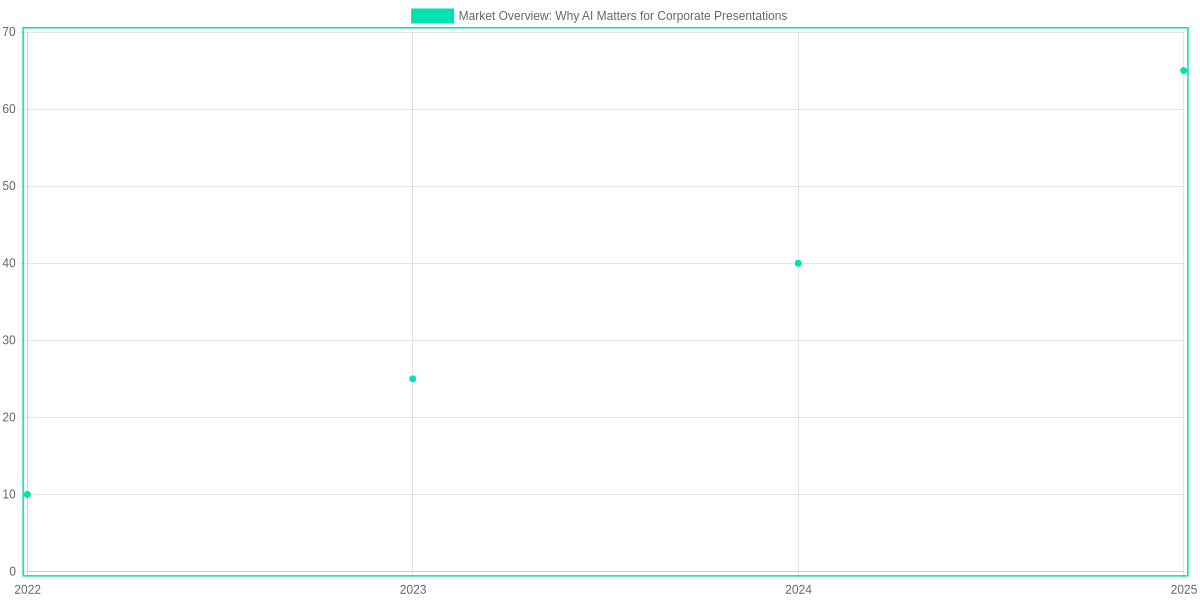
The primary benefits are clear: time saved on slide creation, consistent branding across decks, faster iteration cycles, and stronger storytelling. Tools such as Microsoft PowerPoint Copilot, Google Slides (Gemini integration), Canva, Beautiful.ai, and Tome exemplify these gains in real deployments.
Common enterprise use cases
You’ll see AI used most often for executive briefings, sales decks, investor presentations, and training modules, where speed and narrative coherence matter. Slidebean and Decktopus are common for investor and startup pitches; Canva and Beautiful.ai are frequent picks for branded corporate templates.
Market Snapshot: Why AI Matters
▶
Rapid adoption curve
Enterprise use of AI-enabled presentation features has accelerated, driven by automation and template intelligence.
▶
Time savings & iteration
AI features in PowerPoint Copilot, Canva, and Beautiful.ai reduce slide creation time and speed iteration cycles.
▶
Use-case diversity
Common scenarios include executive briefings, sales decks, investor presentations, and training modules.
▶
Security & governance
60% of IT leaders prioritize data governance—compliance and secure integrations influence vendor choice.
Security and compliance remain deciding factors: 60% of IT leaders prioritize data governance when selecting AI tools, tilting purchases toward Microsoft 365 Copilot, Google Workspace enterprise controls, or private-deployment options. If you require DLP and audit logs, Microsoft PowerPoint Copilot and Google Workspace often lead.
When you evaluate Top AI Presentation Tools for Corporate Meetings, weigh productivity metrics against governance and vendor roadmap — that balance will determine which tool fits your workflow.
In-Depth Reviews of Top Tools (Pros and Cons)
Choose by Meeting Type
Match the tool to how you present. Pick PowerPoint + Copilot for secure, enterprise slide refinement; Canva for branded, collaborative decks; Beautiful.ai for fast, visually consistent slides.
- ✓ Microsoft PowerPoint + Copilot — Enterprise-ready slide refinement
- ✓ Canva (Magic Presentation) — Templates, brand kit, collaboration
- ✓ Beautiful.ai — Automated layouts for consistent design
Microsoft PowerPoint + Copilot
You get the advantage of the native Microsoft 365 ecosystem: deep integrations with Teams, SharePoint, and Azure AD make governance and secure sharing straightforward. Copilot speeds slide refinement and can generate narrative text and visual suggestions from your brief.
- Pros: native Office ecosystem, advanced slide refinement, strong enterprise security
- Cons: requires a Microsoft 365 subscription; AI output can feel generic without careful prompting

Canva (Magic Presentation)
Canva’s Magic Presentation accelerates deck creation with extensive templates and an easy brand kit to enforce visual identity. Collaboration is real-time and intuitive for cross-functional teams.
- Pros: extensive templates, brand kit integration, collaborative editing
- Cons: advanced analytics and some AI features are behind paid tiers
Beautiful.ai
Beautiful.ai excels at automated slide design and enforcing layout consistency across a deck, which saves designers time on routine formatting. It’s built for speed and visual cohesion.
- Pros: automated slide design, consistent layouts, fast content-to-slide flow
- Cons: less granular design control for designers seeking pixel-perfect results
Tome
Tome prioritizes narrative-first generation, producing story-driven slide sequences ideal for pitch decks and fundraising narratives. The prose-to-slide workflow is strong for storytelling.
- Pros: narrative-first slide generation, great for storytelling and pitch decks
- Cons: fewer enterprise integrations and limited granular template control
Gamma
Gamma moves quickly from idea to multi-format outputs, letting you produce slides, docs, and visual briefs from the same source. It’s built for ideation and rapid iteration.
- Pros: rapid ideation, multi-format outputs
- Cons: can be inconsistent when representing complex data visualizations
Decktopus
Decktopus focuses on meeting-ready features like built-in speaker notes and presenter prompts, which is handy for repeatable meeting formats and fast turnarounds. Templates emphasize clarity for meetings.
- Pros: speaker notes, presenter prompts, fast meeting-focused templates
- Cons: customization can be restrictive when you need brand-heavy or bespoke designs
Tool Comparison Table
| Feature | Microsoft PowerPoint + Copilot | Canva (Magic Presentation) | Beautiful.ai |
|---|---|---|---|
| Primary strength | Native Microsoft 365 integration; advanced slide refinement with Copilot | Extensive templates; brand kit and collaborative editing | Automated slide design and layout consistency |
| Main weakness | Requires Microsoft 365 subscription; outputs can be generic at times | Deep analytics and some AI features locked behind paid tiers | Less fine-grained control for designers who want pixel-perfect layouts |
| Best-fit meeting type | Internal town halls, enterprise reviews, investor updates with sensitive data | Marketing decks, sales enablement, cross-functional collaboration | Design-forward client presentations, rapid internal reports |
| Enterprise readiness | High — Azure AD, SSO, enterprise security controls | Medium-High — team and Enterprise plans, brand controls, SSO available | Medium — team features and workspace controls, fewer large-enterprise integrations |
| Pricing model | Microsoft 365 subscription (Copilot add-on in some plans) | Free tier; Pro and Enterprise paid tiers for advanced AI | Free tier; paid plans for teams and advanced features |
How to interpret these pros and cons: match a tool’s strengths to your meeting needs — choose PowerPoint for secure, data-heavy enterprise presentations; Canva for brand-driven marketing decks; Beautiful.ai for fast, consistent visual output. Use the table above as a quick vendor shortlist and test each tool against one representative meeting type from your calendar.
Side-by-Side Comparison: Features, Pricing, and Suitability
You need a tool that balances output quality, integrations, and governance. Microsoft PowerPoint Copilot, Canva Pro, and Beautiful.ai each target different corporate priorities: Copilot for M365-first security and native PPT fidelity, Canva for broad templates and third-party connectors, and Beautiful.ai for design-first teams that want polished layouts quickly.
Below is a practical pilot checklist to validate decisions during trials. Use it to score slide quality, test exports, and confirm SSO and data residency before procurement.
Pilot Evaluation Checklist
📝
Score Slide Quality
Run sample prompts and score coherence, design balance, and editability of generated slides.
🔌
Check Integrations
Verify Microsoft Teams, Zoom, and Google Workspace integrations plus SSO provisioning.
🎨
Test Brand & Exports
Apply your brand kit, export to PPTX/PDF, and confirm visual fidelity and editable elements.
🛡️
Assess Governance
Review admin controls, data residency, audit logs, and compliance certifications.
AI Slide Quality Scores
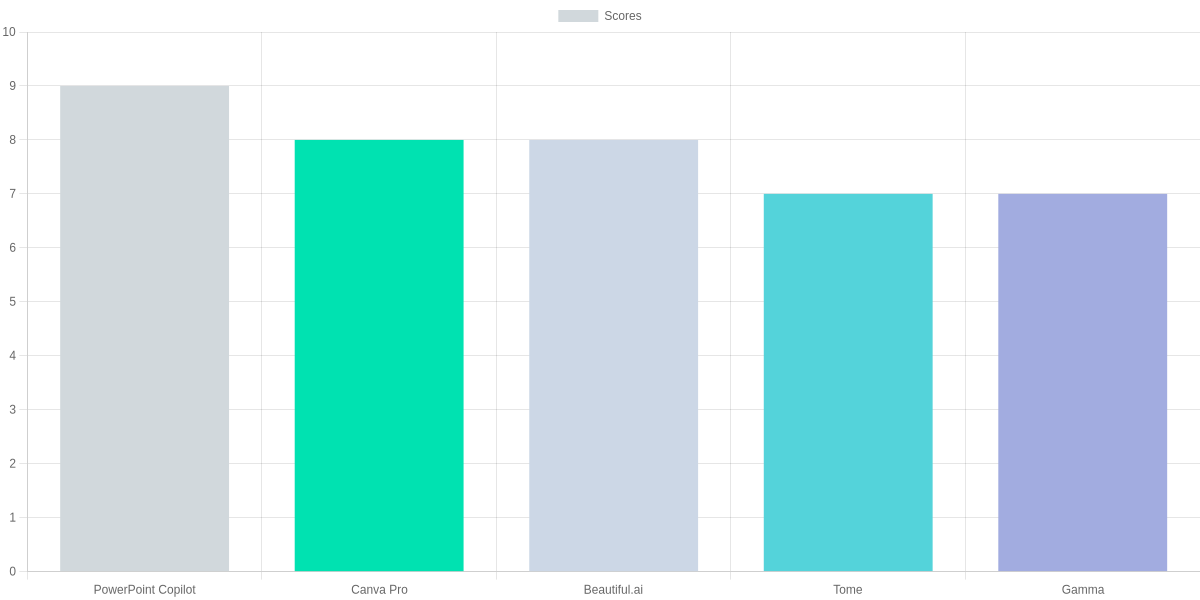
We scored AI slide quality to reflect real-world output: PowerPoint Copilot 9/10, Canva 8/10, Beautiful.ai 8/10, Tome 7/10, Gamma 7/10. If you prioritize slide polish for investor decks, those scores should carry weight.
Feature Matrix & Pricing
The table below compares automated generation, brand support, data visualization, export types, integrations, security, and estimated monthly costs. Use the rows to match tools to your operational constraints and budget.
| Feature | Microsoft PowerPoint Copilot | Canva Pro | Beautiful.ai Team |
|---|---|---|---|
| Automated slide generation | LLM-driven slide creation inside PowerPoint; strong at outline-to-slides and Excel-linked charts | Template-driven slide builder with Magic Write; good for rapid design and brand templates | Template/layout automation with guided content blocks; strong visual polish and consistent spacing |
| Estimated monthly cost/user | Copilot add-on roughly $30–$60/user/month (enterprise pricing varies) | Canva Pro $12.99/user/month; Enterprise billed per seat with discounts | Beautiful.ai Team plans roughly $12–$30/user/month depending on tier |
Pros and Cons (quick review)
- Microsoft PowerPoint Copilot — Pros: Best native PPT fidelity, deep Teams/M365 governance; Cons: higher enterprise cost, M365 dependency.
- Canva Pro — Pros: Excellent brand kit, affordable per-seat pricing, broad integrations; Cons: slightly less LLM-driven narrative polish than Copilot.
- Beautiful.ai Team — Pros: Fast, consistent design and layout automation; Cons: fewer native enterprise connectors than Canva, export-first workflow.
How you weigh scores depends on use case: prioritize integration and governance for regulated teams, and slide-generation quality for pitch-heavy groups.

Implementation and Best Practices for Corporate Meetings
Implementation Checklist
Pilot Cohort
Select 2–3 power users from Sales, Marketing, Product for a 4–6 week trial using Beautiful.ai or Microsoft Copilot in PowerPoint.
Establish Guardrails
Create brand templates in Canva or PowerPoint, set slide approval in Asana/Jira, define data handling rules for Looker/Slack sharing.
Training
Run 60–90 minute workshops, produce quick-reference guides, pair templates with presenter notes in Google Slides/Tome.
Meeting Workflow
Use Gamma or Decktopus to draft slides and ChatGPT/SlidesAI for speaker notes; always require human review for metrics and tone.
Analytics & Feedback
Track presenter time savings (minutes/h), collect audience feedback via Typeform, iterate prompts and templates.
You should start with a pilot: assign 2–3 power users from Sales, Marketing, and Product to a 4–6 week trial using Beautiful.ai, Microsoft PowerPoint with Copilot, or Tome. Measure presenter time saved and qualitative feedback during the trial.
Establish guardrails up front. Publish brand templates in Canva or PowerPoint, enforce slide approvals through Asana or Jira workflows, and set data-handling rules for Looker exports and Slack sharing to remain compliant.
Training and Workflow
Run 60–90 minute workshops, produce quick-reference guides, and attach presenter notes in Google Slides. For meetings, use Gamma or Decktopus to draft slides and ChatGPT or SlidesAI for speaker notes, but require a human to validate context and metrics.
Pros and Cons
- Pros: Faster slide creation (Beautiful.ai), integrated AI notes (PowerPoint Copilot), easy templates (Canva).
- Cons: Risk of hallucinations (ChatGPT/SlidesAI), governance overhead, initial training time.
Calculating ROI and Choosing the Right Tool
Tool comparison: Beautiful.ai vs Tome
Beautiful.ai
Template-driven AI with strong auto-layout and enterprise controls.
- • Auto-layout saves ~2–3 hours/week per presenter
- • Integrates with Google Drive, Slack, Microsoft 365
- • Offers per-user licenses and enterprise seat pools
Tome
Narrative-first generator focused on story-driven decks and rapid prototyping.
- • AI narrative builder reduces deck assembly time
- • Integrates with Figma, Notion, Google Workspace
- • Flexible pricing and easy pilot options for teams
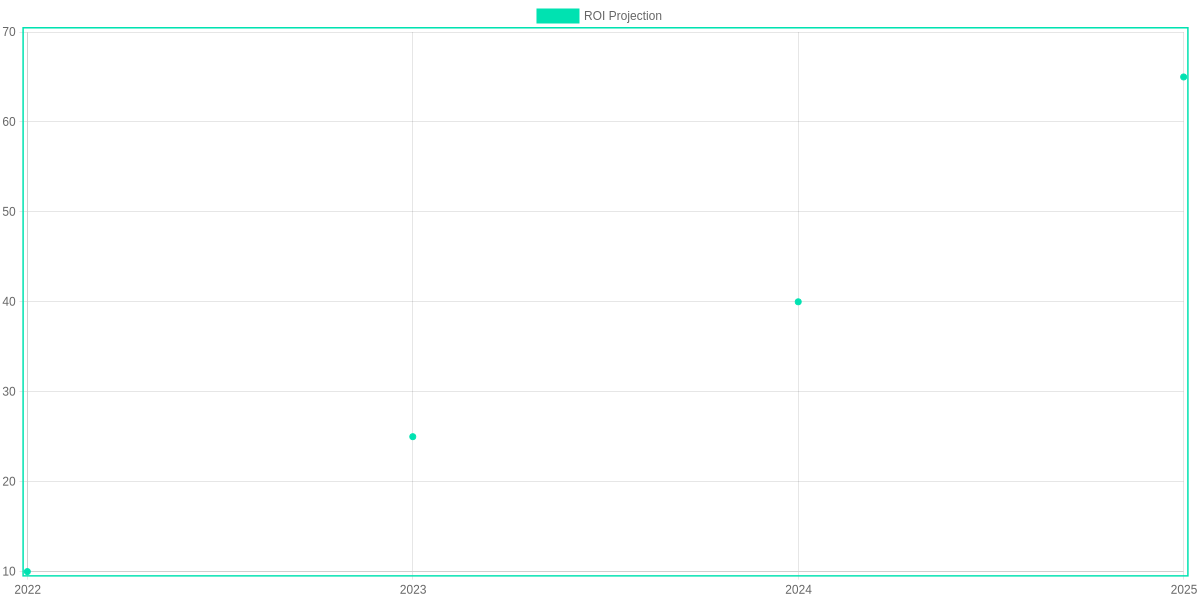
If you save 3 hours per week on deck prep, that’s about 156 hours per year. At $50/hour that equals $7,800 per presenter annually. Multiply by a ten-person team and the annual operational saving is $78,000 before licensing or training.
Adoption & licensing math
Compare per-user licensing to departmental seat pools and add training costs (assume $500 per user first year). Sample 12-month ROI: factor licensing, training, and productivity. For many high-use teams a six-month breakeven is realistic when cumulative savings outpace subscription spend.
Decision checklist
- Integration needs: Microsoft 365, Google Workspace, Slack
- Security: SSO, data residency, access controls
- Content types: data-heavy (charts/tables) vs narrative decks
- Budget: per-user vs seat-pool and pilot costs
Final pick strategy
Shortlist Beautiful.ai and Tome, run side-by-side pilots with identical decks. Measure time saved, slide quality (peer review), and handoff friction. Choose the tool that meets security and integration requirements and delivers measurable time savings within 12 months.
Pros and Cons
- Pros: rapid assembly, consistent branding, reduced review cycles
- Cons: licensing costs, training overhead, occasional AI inaccuracies
Pilot metrics
Track time-per-slide, reviewer edits, approval cycles, and a simple quality score. Use identical source data and an acceptance checklist to compare Beautiful.ai and Tome on the same tasks regularly.
Frequently Asked Questions
You evaluating tools like Microsoft Copilot, Canva, Beautiful.ai, Slidebean, Gamma.app will find common concerns answered below. I provide concise, practical answers focused on security, rehearsal, integrations, visuals and pricing.
Quick notes
Pros: Faster deck creation, automated speaker notes and direct export to PPTX/Google Slides. Cons: Licensing complexity, potential hidden costs, and the need for human validation on data-heavy slides; budget for training and governance.
FAQ Accordion
Are AI presentation tools secure for confidential corporate data?
▼
Can AI tools generate speaker notes and rehearse delivery?
▼
Do these tools integrate with PowerPoint, Google Slides, or Teams?
▼
How accurate are AI-generated visuals for complex data?
▼
What are licensing models and hidden costs?
▼
Conclusion
AI presentation tools can dramatically reduce deck creation time and standardize slide quality, but you must match vendor strengths to your meeting types and governance requirements. This review of Top AI Presentation Tools for Corporate Meetings highlights that Beautiful.ai and Decktopus excel at layout automation, Slidebean and Beautiful.ai at polished design, and Jasper, Gamma, and Tome at narrative and visual richness.
🎯 Key Takeaways
- → AI cuts slide-creation time—Beautiful.ai and Decktopus excel at layout automation.
- → Match strengths to use case—Slidebean and Beautiful.ai for design; Jasper and Gamma for storytelling; Tome for visuals.
- → Pilot and measure—track time saved, slide consistency, deck reuse, and presenter satisfaction before scaling.
Pros
- Significant time savings on slide assembly (Beautiful.ai, Decktopus).
- Consistent, brand-aligned visuals at scale (Slidebean, Beautiful.ai).
- Stronger narrative generation and research support (Jasper, Gamma, Tome).
Cons
- Vendor strengths vary—no single tool excels at every requirement.
- Governance and compliance need custom controls and review workflows.
- Initial setup and templates require time to align with corporate standards.
Next steps: run a focused pilot with one meeting type, instrument time saved, slide consistency, deck reuse rate, and presenter satisfaction, then use those metrics to select the scalable option that fits your governance needs.
TL;DR: AI is transforming slide creation—tools like PowerPoint Copilot, Google Slides (Gemini/Duet), Canva, Beautiful.ai, Slidebean, and Tome speed up prep, improve visuals, and auto-generate speaker notes for more consistent, polished decks. This review compares those tools on performance, design, collaboration, and security, offers implementation tips for Teams/Zoom, and highlights enterprise priorities like data governance, compliance, and vendor lock‑in to help procurement and presentation teams choose wisely.
In conclusion, choosing the right AI tool can greatly speed up your work. For corporate meetings, you should choose a tool that saves time and keeps the design professional at the same time. Choose the best one according to your needs from the tools discussed above and impress everyone at your next meeting. Remember, AI technology will not only make you smarter, but will also keep you one step ahead of others.
“Ready to transform your next corporate presentation?
📊 Don’t let manual designing slow you down. Choose the AI tool that fits your workflow from our top-rated list and start creating high-impact slides in minutes!
✨ Your audience—and your schedule—will thank you. 🤝💼”

I ‘m Md. Osman Goni > Founder of SearchAIFinder and an AI content specialist. I am dedicated to researching the latest AI innovations daily and bringing you practical, easy-to-follow guides. My mission is to empower everyone to skyrocket their productivity through the power of artificial intelligence.”
💬 We’d Love to Hear From You!
Which of these AI tools are you excited to try first? Let us know in the comments below!